Skip to content
GetProfit
Demo

Platform · What changed

Who changed what in your ads — and how it ended

The portal keeps a log of changes: budgets, bids, conversion goals, product sets, whole campaigns. For each one it works out what things were like before and after, and says it plainly: did it work or did it hurt.

The portal only reads your account. It cannot write to Google Ads at all — not one change from it will show up in your ads.

Change feed

1 worked 1 harmed
  • 26 June · your side

    harmed

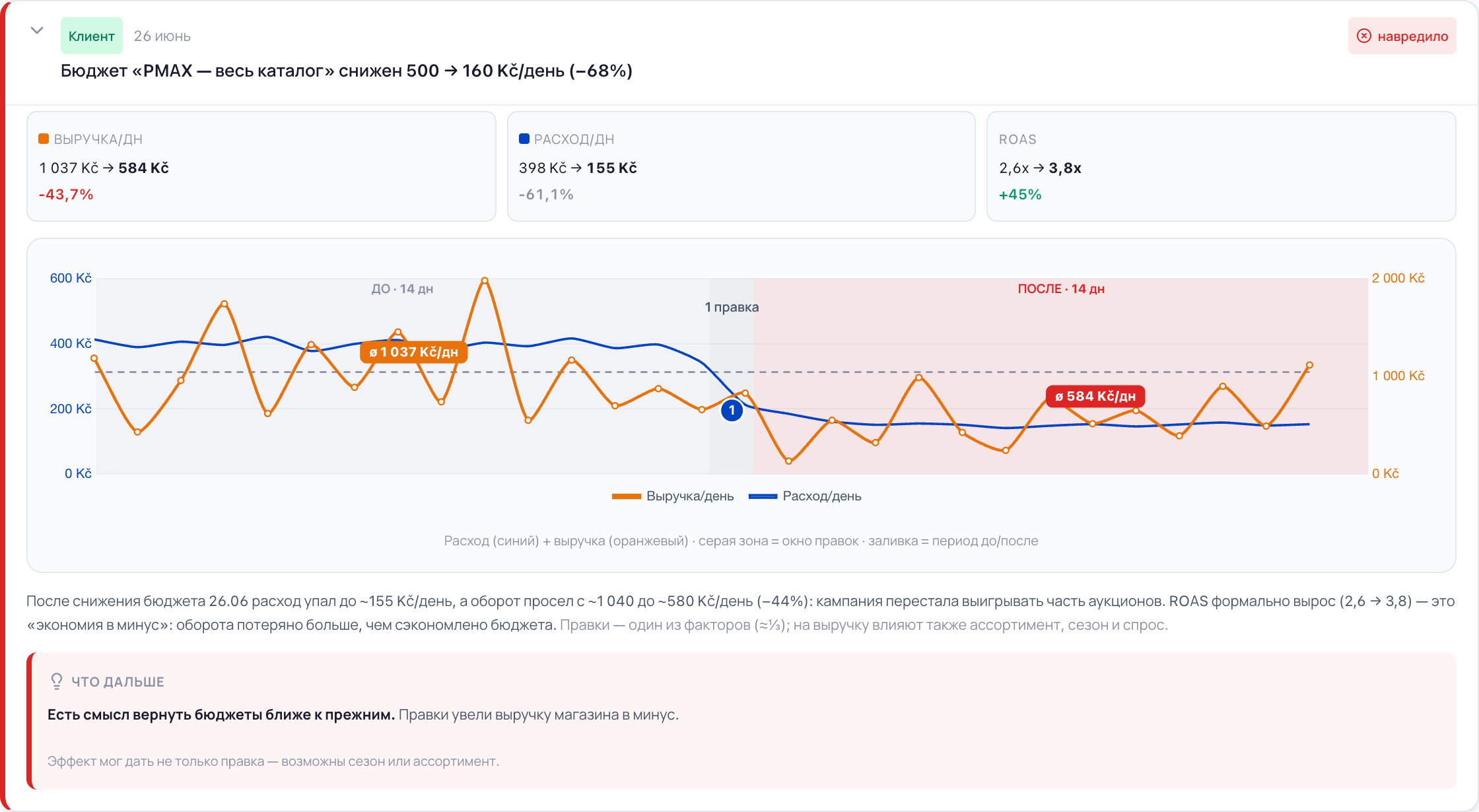
    Campaign budget lowered from 500 to 160 CZK a day

    revenue −43.7% a day

  • 24 May · GetProfit

    worked

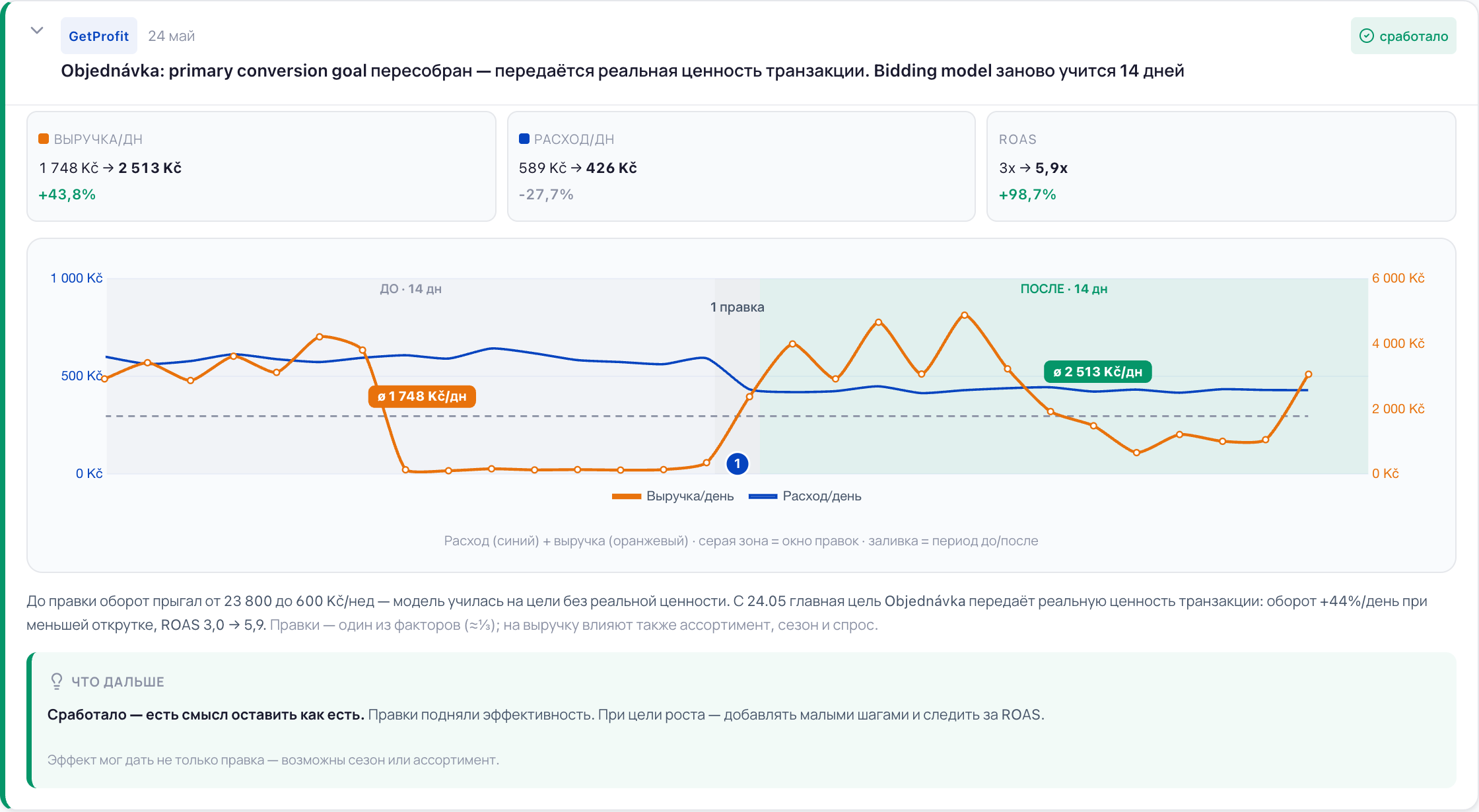
    Primary conversion goal rebuilt: the real order value now goes into it

    revenue +43.8% a day

This is how the feed looks in the portal. The example is a demo account of a made-up shop.

How this usually starts

The ads live their own life, but the shop answers for it

Three conversations that make people open this section.

“The contractor tweaked something and didn't tell me”

The report arrives once a month, and between reports the work in the account goes on. What was changed and why, you find out later — if you find out at all.

What the portal does

Shows every significant change: when, what and who — the GetProfit team, your side or Google's own automation. And what the change came to in money.

“We cut the budget and saved money. Or did we?”

Spend fell — on paper that is a saving. Revenue fell harder, but you see it about two weeks later, when the cause can no longer be found.

What the portal does

Counts both sides at once: how much was saved and how much was lost. If more was lost, it says so — harmed, and it is worth bringing the budgets back closer to what they were.

“Sales dropped and nobody remembers what was changed”

Google keeps its change log for less than a month. A month and a half on, there is nowhere left to find out what was done and when.

What the portal does

Takes the log to itself and keeps it longer. A change from two months ago won't go anywhere, and neither will what came before it and after.

An example from the feed

A saving that cost more than it saved

The campaign budget was cut from 500 to 160 CZK a day. Spend duly fell by 61%, ROAS rose from 2.6 to 3.8 — by the report everything looks fine. But revenue sank by 43.7%: the campaign stopped winning part of the auctions.

The portal doesn't celebrate the higher ROAS, it calls the thing by its name: the change harmed, and it is worth bringing the budgets back closer to what they were. And it adds a caveat straight away — the effect may not have come from the change alone.

One change in full: what was changed, what happened to the money, the verdict and what to do next
One change in full: what was changed, what happened to the money, the verdict and what to do next Enlarge →

When a judgement is possible

The portal doesn't pass a verdict the next day

After a change Google's algorithm relearns, and the first days show anything but the truth. So every change has a point before which the portal stays silent, and a point after which it stops judging.

Before the change Change After the change

The month before the change — what everything after it is compared against.

  1. 7 days

    The first conclusion — marked “preliminary, still collecting data”.

  2. 14 days

    A confident conclusion: the change worked or it harmed.

  3. 30 days

    Beyond that the portal no longer judges the change — over a month too many other causes pile up.

If the same setting was touched again, the portal doesn't count the changes separately: it links them into one story and compares that with what was there before the very first one. And several changes to one setting within a day are merged into one — it judges by the day's net result and keeps the intermediate steps inside the card.

And the other way round: a change that brought the money back

The primary conversion goal was rebuilt so that the real order value goes into it instead of a substituted one. Two weeks later revenue was up 43.8% a day and spend down 27.7%; ROAS went from 3.0 to 5.9. Verdict: worked, worth keeping as it is.

The same card, a different outcome: three before → after figures, a chart and the conclusion
The same card, a different outcome: three before → after figures, a chart and the conclusion Enlarge →

What you see first

At the top sits the reason to open the portal at all

A feed can get long. At the top there is one line — the weightiest thing in the period: what dropped, by how much and what share of the account's money it touches. If nothing important happened, the portal says exactly that: no significant changes.

The section's top line: what dropped, by how much and what share of account spend it touches
The section's top line: what dropped, by how much and what share of account spend it touches Enlarge →

What's next

Every conclusion ends in an action, not a grade

The portal changes nothing in the account itself — it says what is worth doing, and you decide.

Bring it back closer to what it was

The change took the money into the red. The portal names exactly what was moved — the budget, the target ROAS or another setting.

Keep it as it is

The change lifted efficiency. If you want to grow further — add in small steps and watch ROAS.

Let the window mature

Too little time has passed, or there isn't enough data. The conclusion appears when there is something to build it on.

Under every conclusion there is a caveat: the effect may not have come from the change alone — season and assortment happen too. And if another significant change fell into the same window, the portal says the effects may mix.

Honest answers

Sometimes the honest answer is: nothing to judge yet

A conclusion built on nothing is worse than no conclusion: decisions get made on it. So the portal says plainly when there is nothing to assess, and explains why.

Too early

The change is less than a week old. The ads are still relearning, and any conclusion would be guesswork.

Too little data

Fewer than seven conversions accumulated before the change. There is nothing to compare against — the portal watches but draws no conclusion.

The campaign was stopped

Spend and orders stopped because the campaign was switched off. That is not the effect of the change, and the portal doesn't judge it.

Conversions can't be trusted

If the conversion check showed the data can't be trusted, the portal hides the before → after. It will show what was changed; how it ended, no.

A change reverted the same day isn't assessed either — but it is remembered: it counts towards how often the ads get jerked around.

Change discipline

Separately — how often and how sharply the ads get jerked around

Google's algorithm needs time to learn. If the budget is edited three or four times a week, or moved by two thirds in one go, it keeps learning from scratch.

The portal counts a budget step above 50% and a target ROAS step above 15% as sharp. Frequent means more than three changes a week on one campaign. This is a conversation about behaviour, not about revenue, and the portal labels it that way.

A campaign under watch: a budget step of 68% against a threshold of 50%
A campaign under watch: a budget step of 68% against a threshold of 50% Enlarge →

Access

Google Ads. Sign in with Google in one click — the portal changes nothing in the account without your consent

Plan

The change feed and a conclusion on every change — on every plan, including the free one

Alerts on serious problems — the Scale plan, currently in development

Email summaries — the Scale plan, currently in development

Window

The first conclusion a week after the change, a confident one after two. Older than a month and the portal no longer judges the change

The screens come from the demo account in the portal: a made-up shop, no client data on them.

Common questions

Will you get into my account and change something there?

No, the portal only reads — it cannot write to Google Ads at all. But the Google Ads API has no separate read-only access: the same access is granted for both reading and writing, so the list of permissions on Google's screen sounds broader than what the portal does. If you would rather not hand that over — sign in with a Google account that holds the Read only role in your account: the portal inherits its permissions and cannot change anything, even in theory.

How to grant the Read only role

Will the portal write to me when something happens?

Not today: you open the section yourself. Regular email summaries and an alert on serious problems are part of the Scale plan, and it is still in development. We won't promise them as working.

How does the portal know who made the change?

From the Google Ads log itself: it records the author of every change. The portal splits them into three sides — the GetProfit team, your side and Google's automation. It shows automation's changes but doesn't assess them: those are Google's own decisions, not anybody's — there is no one to judge here.

Are you sure it is the change and not the season?

We aren't sure — and we don't pretend to be. The portal shows a link in time, it doesn't prove a cause: under every conclusion there is a caveat that the effect may not have come from the change alone. If another significant change fell into the same window, it says the effects may mix. The decision is still yours — but now you see both sides.

An agency runs my ads, it reports to me anyway

Then the conversation will run on one set of data. The portal doesn't pass sentence on your contractor: it shows what was changed and how it ended, and it will show just as clearly when everything is fine. It also sees the changes that don't usually make it into a report — the small and frequent ones.

I have a small shop, there are hardly any changes

Then the feed will be short, and that is a normal answer. The section doesn't invent events: if nothing significant happened in the period, it says so.
Find out what was changed in your ads and how it ended

Sign in with Google in one click. The portal changes nothing without your consent.

See what changed in your account

