Skip to content
GetProfit
Demo

Platform · Account score

What state your ad account is in

One score instead of a dozen tabs of figures — plus a breakdown of exactly where the money leaks.

A GetProfit score based on your account data — not an official Google metric.

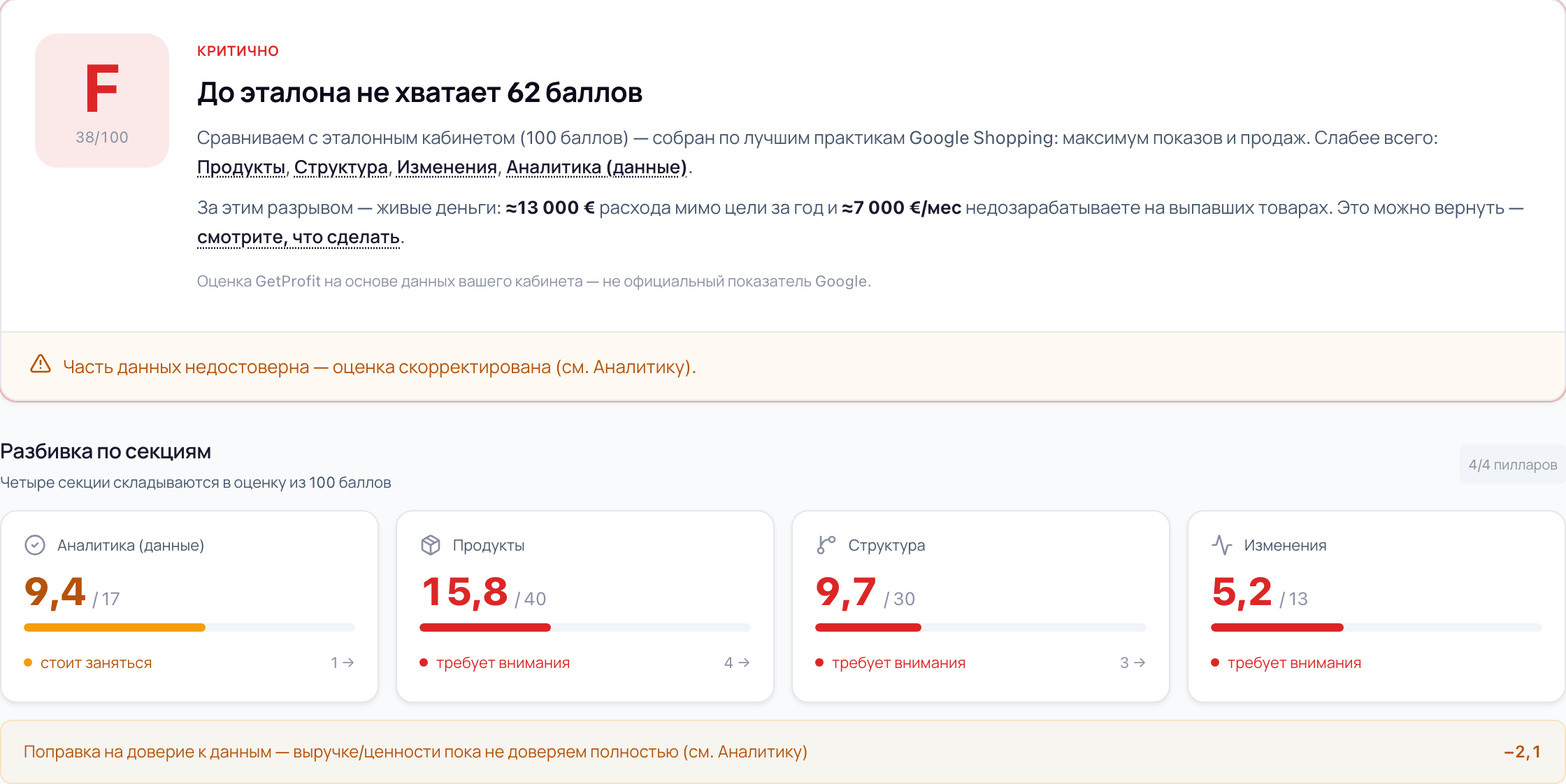
The score card in the portal: grade, score and the gap to the benchmark
Enlarge →

The breakdown by area

See your weak spot in ten seconds

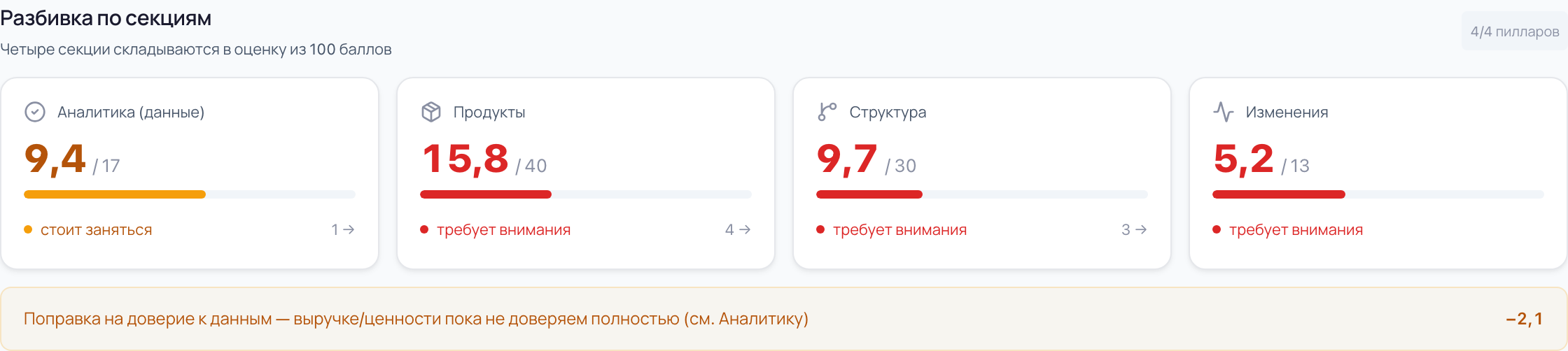
A score out of 100 with a letter beside it, and under them four areas: the data Google receives, products, campaign structure and the history of changes in the account. Both the weakest and the strongest side show at once.

A breakdown across four areas with a verdict on each
A breakdown across four areas with a verdict on each Enlarge →

You see where the shop is heading — and how far it is from ideal

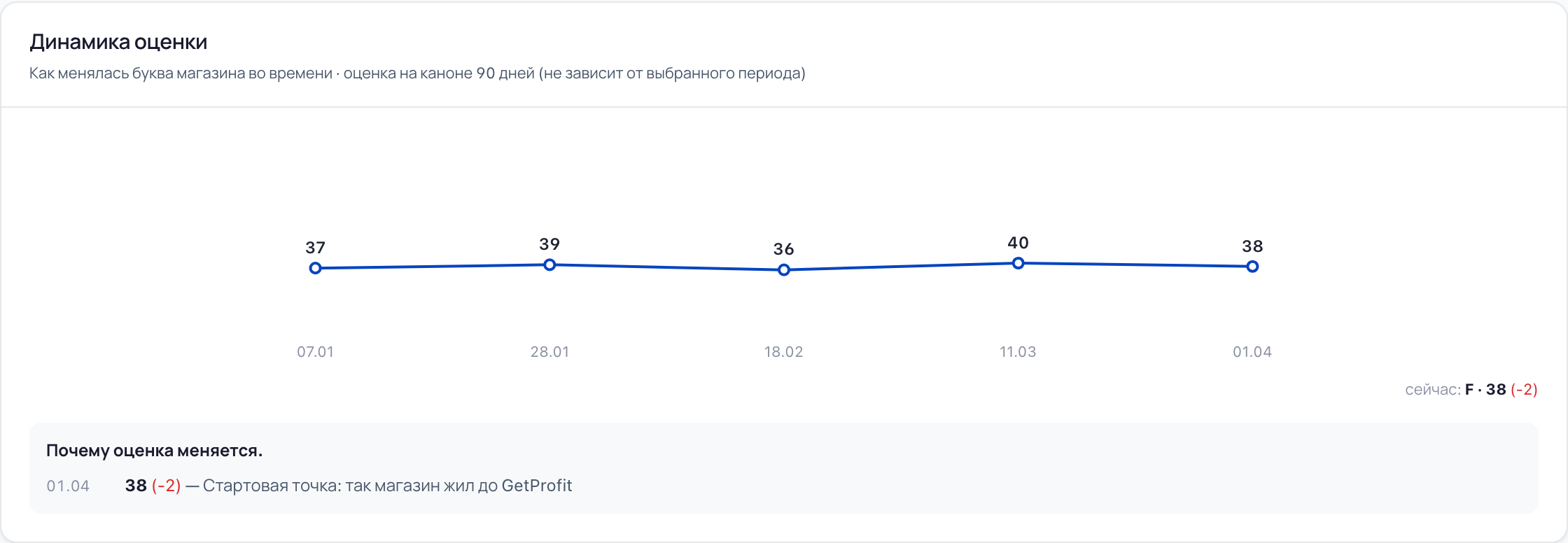
You see how the shop's score moved and how each change made affected it: the portal recalculates the score on every data refresh, and under the chart it says what moved it — what worked in your favour and what dragged it down. The reference point is not last month but a benchmark account of 100 points, built on Google Shopping practices. Your score is the distance to it.

How the score moved over 90 days
How the score moved over 90 days Enlarge →

The gap to the benchmark is measured not only in points but in money

The portal turns the missing points into amounts: how much spend a year misses the goal and how much you under-earn per month on products that vanished from ads. And that is only the part of the loss the figures can show. We count on your shop's own history, not on market averages.

The score card in the portal: grade, score and the gap to the benchmark
The score card in the portal: grade, score and the gap to the benchmark Enlarge →

When the data has an error, we flag it instead of painting a pretty report

If the ads are learning on something other than purchases, or every conversion carries the same substituted amount, the portal applies a trust adjustment and explains why the score is lower. On data like that a report would look better than the shop really is — so we show the error instead of hiding it behind nice figures.

The data trust adjustment — the score is lowered, and it says why
The data trust adjustment — the score is lowered, and it says why Enlarge →

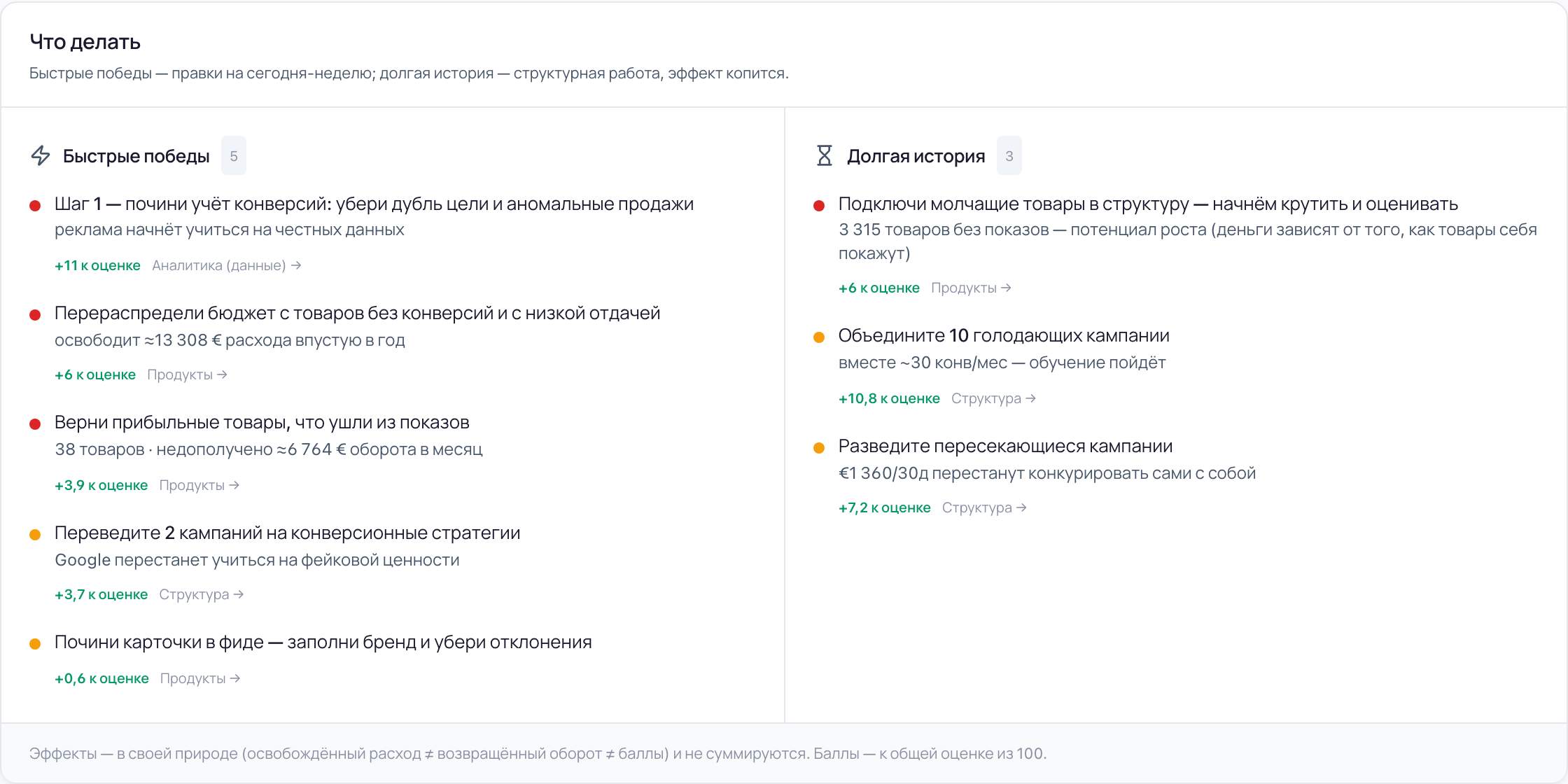
The score ends in a plan, not a scoreboard

Under the score sit the changes: quick wins for today or this week, and the long game where the effect compounds. Each one says how much it adds to the score and what it gives the shop in money — freed spend and recovered revenue — and some carry a note: you do it yourself, or GetProfit can take it on.

The plan: quick wins and the long game, with every change scored for what it adds
The plan: quick wins and the long game, with every change scored for what it adds Enlarge →

Five states an account can be in. Yours is one of them

  1. A

    90–100

    Excellent shape

  2. B

    75–89

    Good

  3. C

    60–74

    Satisfactory

  4. D

    40–59

    Needs attention

  5. F

    0–39

    Critical

The score is computed on a fixed 90-day window and does not depend on the period selected on screen.

What people usually run into

Three situations that most often send people to the score.

“I don't understand what's going on in the account”

The team kept changing: one marketer, then another, then an agency. For a while you ran it yourselves, then handed it over. Now it's unclear what works, what doesn't and what to do next.

What the portal does

Shows the state of the account on one screen: the score, the gap to the benchmark and the area dragging it down hardest. No need to dig through someone else's settings.

“ROAS 6 in the report, and nothing in the bank”

The report looks great, but there is no money in the bank. Nothing to argue with — the figures do come from Google.

What the portal does

The portal first checks whether the conversions can be trusted, and only then counts money. If they can't, it lowers the score and explains why, instead of drawing a pretty figure in the report.

“The budget grows, the revenue doesn't follow”

Spend went up, revenue stayed roughly the same. There are thousands of products in the catalogue — you can't review them all by hand, and it's unclear which work and which don't.

What the portal does

Shows how much spend misses the goal and how much is under-earned on products that vanished from impressions — from your shop's own history. And which of it gives the most.

Sometimes the honest answer is: no score

If there was no spend and no impressions in the period, there is nothing to score — we will say so rather than invent a letter.

Access

Google Ads. Sign in with Google in one click — we change nothing in the account without your consent

Plan

The account score is in every plan, including the free one

Window

90 days. Independent of the period selected on screen

Screens from an account in the portal. Account score: points, a letter and a breakdown across four areas — Free.

Common questions

What does it take to see my score? Are you going to poke around in my account?

Signing in with Google, one click. The Google Ads API has no separate read-only access — the same access covers both reading and writing, which is why Google's list of permissions sounds broader than what the portal actually does. If you'd rather not hand it over that way, sign in with a Google account that holds the “Read only” role in your account: the portal inherits its permissions and cannot change anything, even in theory. How to grant it — in the guide.

Is this an official Google score?

No. It is a GetProfit score based on your account data. It has nothing to do with the optimisation score inside Google Ads and is computed differently: we compare your account against a benchmark built on Google Shopping practices.

You lower the score to sell services. Explain

The method is the same for every account and measures the state of the account, not readiness to buy. Every change states what it adds to the score, and the score rises by the same amount whether you make the change yourself or with our help. What counted towards the score and what did not is written right below it.

I already have a contractor. Why would I need another score?

So the conversation runs on one set of data. The score passes no verdict on your contractor — it names the area dragging things down, and the changes with what each one adds to the score. If everything is fine, that shows too.
Find out your account score

Sign in with Google in one click. The portal changes nothing without your consent.

Get your account score