7 key Google Ads tips for online stores
Product titles, assortment segmentation, price, ROAS and budget, stock availability and seasonality — seven things that decide the outcome of an online store's campaigns.
9+ million CZK invested into Google Shopping Ads
200,000 items analysed
Tip #1 — Product title
Pay attention to the titles of your products. They should match the way your customers name them.
Example: we had “ice cream moulds” in a product title, but based on search queries we renamed it to “moulds for popsicles and ice cream”.
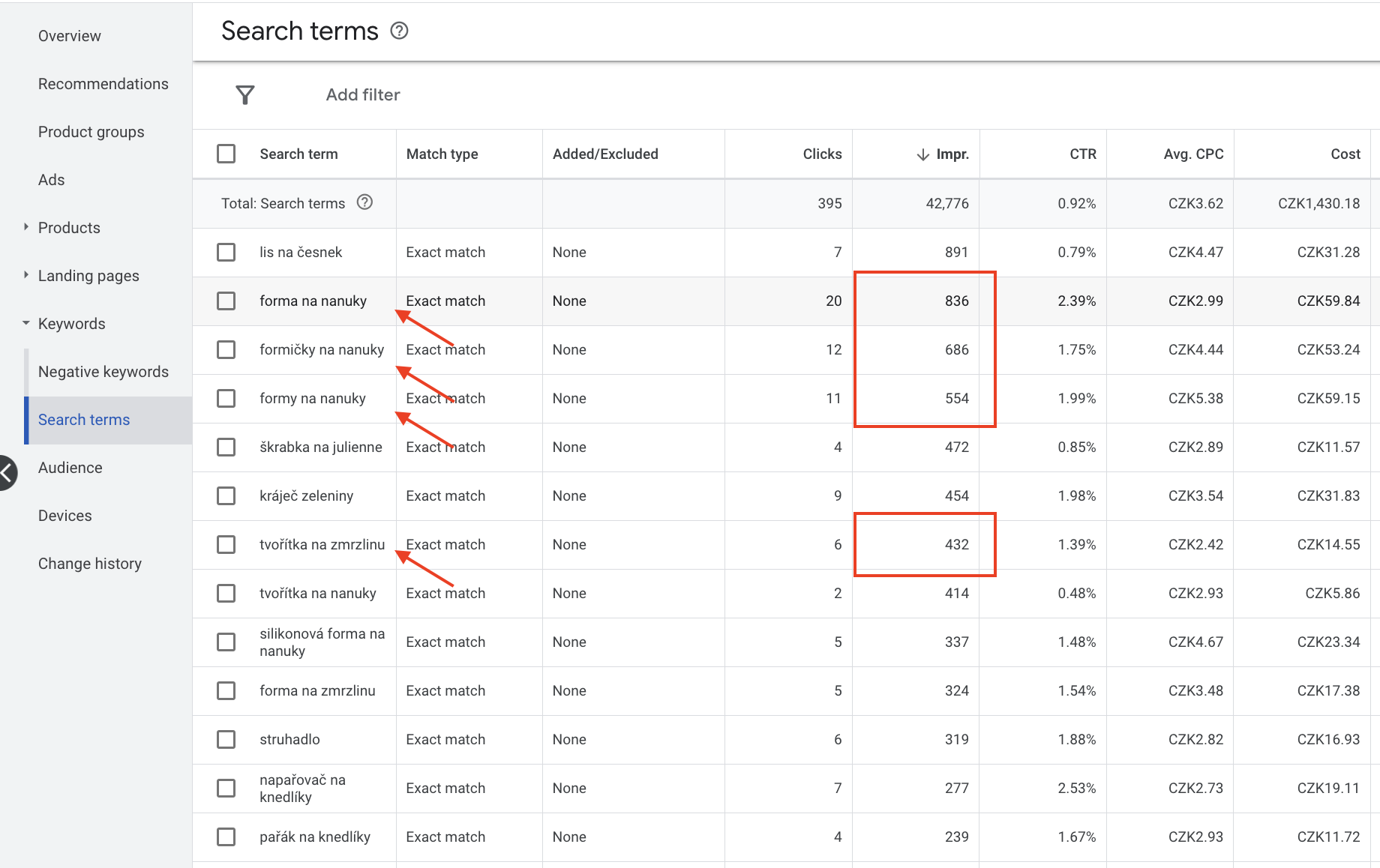
By giving a detailed product title that matches users’ search queries as closely as possible, you increase your chances of:
- products showing in top positions;
- a higher number of impressions;
- a higher CTR (number of clicks vs. number of impressions);
- a more relevant click (more information);
- a lower cost per order and a higher ROAS.
Another example:
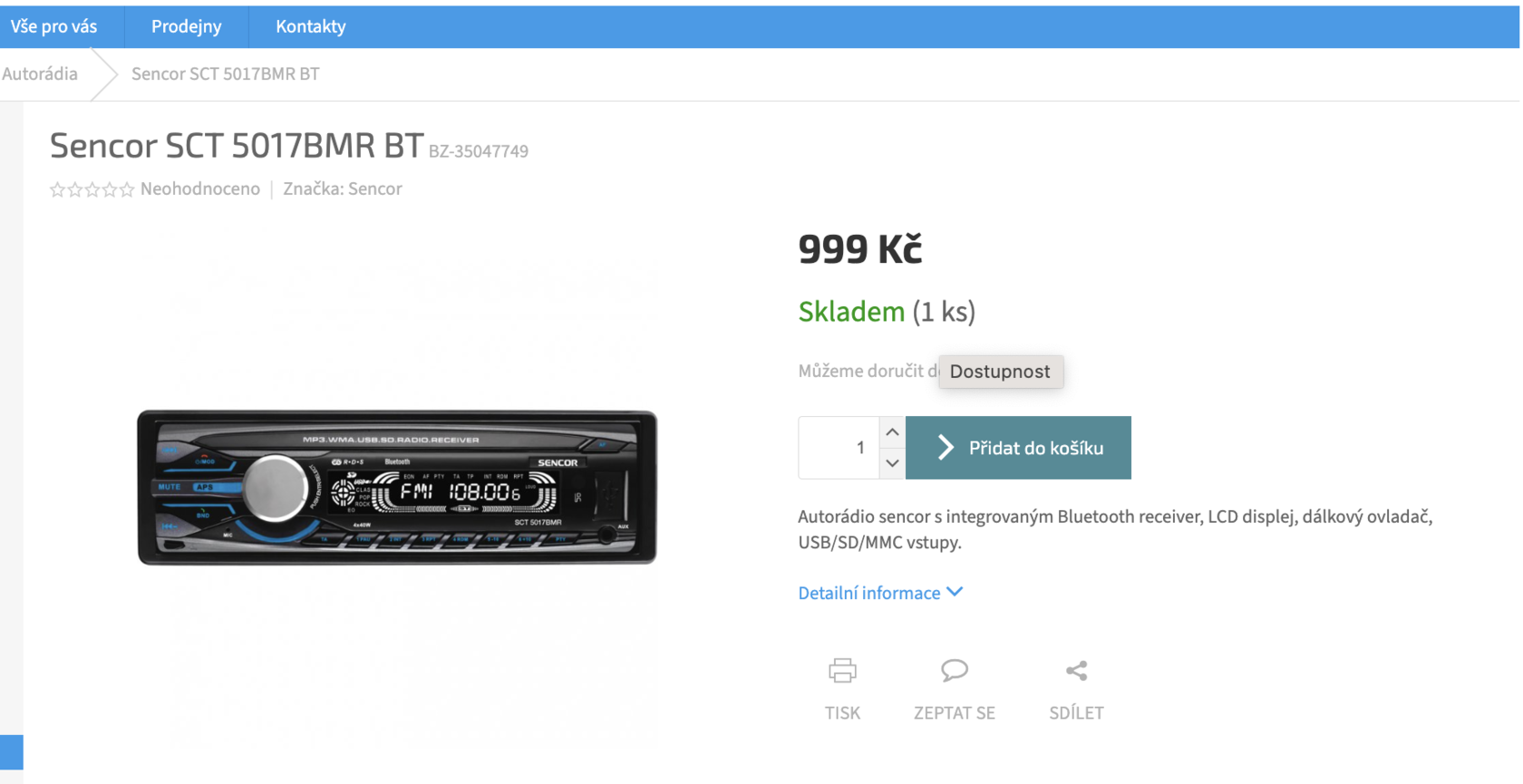
The title contains no information about the product.
It would be good to put into the title:
- What kind of product is it?;
- What is it for?;
- Important parameters that customers search for.
After a short market check we came up with this name:
“Sencor car radio with USB and Bluetooth SCT 5017BMR BT”.
Tip #2 — Item segmentation
The main idea is combining the Pareto 80/20 rule with the BCG matrix.
In other words, we should invest the most resources into the items with the best return.
The BCG matrix shows us which items are the most effective in terms of sales. It then splits the whole assortment into 4 groups.
This approach works mainly for these ad types:
- Shopping
- Performance Max
For basic segmentation, the sales volume indicator is what matters. Many people believe margin is the most important parameter. In this case that is not so.
There is no point in promoting something there is no demand for. Unless, of course, you are aiming to create a completely new market, which takes a lot of investment and time.
That is why you first need to find out which items sell best for you — that is where you will direct most of your advertising budget. This way you will achieve a higher number of:
- impressions;
- clicks;
- sales.
If you exclude these products from promotion, the consequences may be:
you lose momentum = not enough data to optimise Google ads = a drop in the performance of your advertising
It is equally important to identify products that customers do want, but that are not selling.
The reason may be:
- price;
- description;
- image.
Another important parameter is ROAS or the cost-to-revenue ratio (the advanced strategy is to focus on margin. We cover this approach in more detail on our blog).
The result of item segmentation is:
- 4 product types (Winners, Potentials, Zoombies, Loosers)
Analysis and segmentation of items should be done fairly often — it only depends on how big a budget you have for it.
Example:
- 1000 items in the assortment
- 1000 CZK daily budget
- 1000 CZK average order
- cost-to-revenue ratio is 20%
Per day you will get on average 5 orders worth about 5000 CZK.
Result:
- Some items were ordered;
- Some items got clicks but no sales;
- Some items that are profitable for the business were ordered;
- The rest of the items did not have enough data to be assessed.
The next day you will collect more data, but if you are not able to analyse it and make timely changes, the outcome is:
- More was spent on an item than the budget maximum allowed;
- A well-selling item gets few impressions.
That is exactly why we came up with a tool that constantly analyses and implements changes in advertising — GetProfit
Tip #3 — Structure of item segmentation
Your advertising strategy should depend on your sales volume.
After analysing many online stores, we came to the following conclusion:
Small store (up to 100 sales per month)
You split items into 2 groups:
- Products with a sales history (you set a higher budget and a lower ROAS);
- Products without a sales history (you set a lower budget and a higher ROAS).
Medium-sized store (100 to 1000 sales per month)
Items are split into 3 groups:
- Products with a sales history and an acceptable ROAS (60-70% of the budget, lower than ROAS);
- Products with insufficient data to decide on effectiveness (20-30% of the budget, higher than ROAS);
- Products that have reliably proven they use the budget ineffectively (5-10% of the budget, higher than ROAS).
Large store (more than 1000 sales per month)
Items are split into 4 groups:
- Bestsellers (deliver up to 60+ % of profit, consistently)
- Products with potential (bring sales, inconsistently and not always at the target ROAS)
- Products with insufficient data to decide on effectiveness (20-30% of the budget, higher than ROAS);
- Products that have reliably proven they use the budget ineffectively (5-10% of the budget, higher than ROAS).
Enterprise stores
The same structure as for large stores, only additionally split by product category.
Tip #4 — Price
You will find price suggestions in the Google Merchant Center > Price Insights reports.
In roughly 20% of cases, lowering the price by 3-7% gets you more impressions, clicks and conversions.

Tip #5 — Setting ROAS and budget
The first and most important rule is that changes can be made at most once every 2 weeks.
Google is a statistical tool, and any change disrupts its statistical algorithm.
With a change of 10-15%, the deviation from your targets should not be serious.
But with a change of more than 20-30%, the results can be completely unpredictable.
Another interesting detail we found is that the more conversions there are in the account, the faster changes take effect and the smaller the deviation will be:
- Up to 30 conversions per month = any change plays out really very unpredictably;
- 30-60 conversions per month = you can count on the deviation not being large
- 60-100 conversions per month = the deviation is minimal
- 100+ conversions per month = the deviation is minimal
Tip #6 — Availability and stock
Keeping an eye on the stock levels of your bestsellers is one of the most important things.
If items with the best / highest sales performance run out of stock — advertising effectiveness drops significantly => impressions fall because the target ROAS/CPA is not reached => which leads to a lower budget and revenue.
Our tool watches product availability and, when stock levels change, automatically adds the product to the ad campaign or removes it.
Tip #7 — Seasonality
Based on thorough analysis, we came to another important conclusion.
To track seasonality effectively you need to analyse data from previous years and compare it with the relevant data of this year.
According to our data, every product sells well for 2 to 5 months a year on average. In the remaining months, investing advertising budget into those items will more likely lose you money.
At GetProfit we track seasonality too. We analyse the sales of your assortment over the past years and at the same time watch what is happening right now.
10 moves that bring more money from almost every order
Raising average order value for e-shops: 10 tactics with difficulty, impact and speed of results — and a step-by-step micro plan for each.
You work twelve-hour days and the store doesn't move. It's not you, and it's not the ads
Why an online store grows primarily through its assortment: data from 100 stores over 13 months, a four-step system, and one owner's personal experience.
Playbook for Quick Wins with Product Data
Where to look in Google Ads and Merchant Center for quick improvements, and how to rewrite title, description and price so impressions, clicks and orders grow.
Sell-Through Rate and Assortment KPIs: What to Track and How
See which products sold the stock you bought: sell-through rate on a worked example, plus ad-data KPIs that measure your catalogue, not just your orders.
How the right taxonomy improves ad performance
Google Taxonomie: why product visibility, CTR and conversion rate all depend on getting the categories and attributes of your product feed right.
Products Not Showing in Google Shopping: Which to Bring Back
Learn why products get no impressions in Shopping and Performance Max and which deserve another chance: a product in no campaign returns with one setting.