4.5M CZK into Google Ads. What we figured out
We go into the principles and explain what matters when setting up Performance Max and Google Shopping campaigns.
If you’re running into the following challenges in Google Ads, this article offers a solution for a whole range of situations:
- Revenue from advertising won’t grow
- Advertising efficiency is weak
- Falling sales
- Falling impressions
- Worsening cost-to-revenue ratio
- Rising cost per conversion
We’ll show you what basic mistakes are made when setting up Google Shopping and Performance Max campaigns, and how to work with those mistakes.
Based on our own experience we’ll tell you what we tried, what works and what doesn’t, and why. We’ll also show you what to do in each specific case so that your campaigns grow.
Let’s start with the very basics. We know the feeling well: you read or listen to an article or a lesson and it seems you’ve understood everything. But in practice the questions come afterwards:
- What do I do in my case?
- What do I click on?
- I’ve calculated the metrics — now what?
- And so on.
We wrote this article for almost two months. We experimented for years, tried different approaches, learned a lot and spent millions of crowns to arrive at these results.

So there are 3 factors that affect your advertising:
- Bids and bidding strategy
- Relevance of your assortment
- Your position in the market
Quick links
- Bids and bidding strategy
- Types of campaign structure
- Search volume — Google Shopping
- Margin — Google Shopping
- Expected CPC — Google Shopping
- Assortment relevance
- Product title
- Modifiers
- Product description
- Product category
- Images
- GTIN/EAN/MPN
- Your position in the market
- Brand
- Historical data
- Price
- Step-by-step guide
- Collecting data
- Analysing data
- Optimisation and metrics: relevance · products · ROAS · locations · devices · time and days of week · audiences
- Performance Max structure
- Summary
Bids and bidding strategy
Your bid or pricing strategy depends on how much you’re willing to pay per click and under what conditions.
With Google Shopping you have a choice between manual CPC and Smart Bidding, i.e. automated strategies.
With manual control you set a maximum cost per click and Google won’t exceed it.
If you work with Smart Bidding, you set Google the conditions under which you want to pay for advertising. There’s the option of paying per conversion/sale/click or for conversion value. And Google itself decides what bid to place based on various conditions:
- Historical account data
- Trends
- Historical user data and demographics
- Time and day of the week
Many people are deeply suspicious of smart bidding, thinking Google will burn their money on an automated strategy.
However, used correctly, Smart Bidding can be the most effective way to increase sales and efficiency of your Google Shopping and PMAX campaigns.
Smart Bidding also saves the marketer’s or owner’s time. Which means it lowers costs.
But if you don’t take Google’s algorithms into account, the consequences will be these:
- Falling impressions
- A worsening cost-to-revenue ratio
- Falling conversion value
- Rising cost per conversion


It’s advisable to track these metrics across several different periods:
- Last 14 days
- Last 30 days
- Last 60 days
- Last 90 days
If you look at only one metric to analyse campaigns — the cost-to-revenue ratio, say — it can have unpleasant consequences.
For example: when the cost-to-revenue ratio improves, revenue quite probably falls.
For Google Ads campaigns to keep delivering results, it’s important to follow the rules and split the work into several cycles. The initial setup takes the most time, but the subsequent steps should be done roughly once a week.
To say it upfront: all the cycles are designed so that you can be sure you’re in control of your campaigns, PMAX included.
Note!
- If you’re starting out, use manual CPC.
- Example: average order value is 1,000 CZK and margin is 400 CZK. Set a bid of 4 CZK per click.
- If you already have campaigns running on Smart Bidding, then track several metrics by period and optimise campaigns and assets for the algorithms.
Campaign structure
In 90–95% of cases the structure is set up like this:
- 1 campaign
- 1 asset group
- all products
Such a structure can generate sales, but the result is usually:
- No growth
- Falling sales
What to do if you’re in a similar situation?
Understand your assortment. What results does it produce? What sells well? What’s your margin? From the answer you’ll understand how the items can be segmented.
There are several segmentation options. The choice depends heavily on the campaign type.
For a Standard Shopping campaign (Google Shopping):
- Search volume
- Margin
- Expected CPC (cost per click)
For Performance Max campaigns:
- Product categories + Margin
From these values you can build a campaign structure that lets you create a stable and growing sales channel.
Search volume — Google Shopping
Simply put, this is about estimating demand for your products.
The estimate is calculated using the Keyword Planner tool in Google Ads. You can log into your account and, by entering a link to a product category, find out how large the demand for those products is. Or alternatively list, in your own judgement, the most frequent queries for your product.
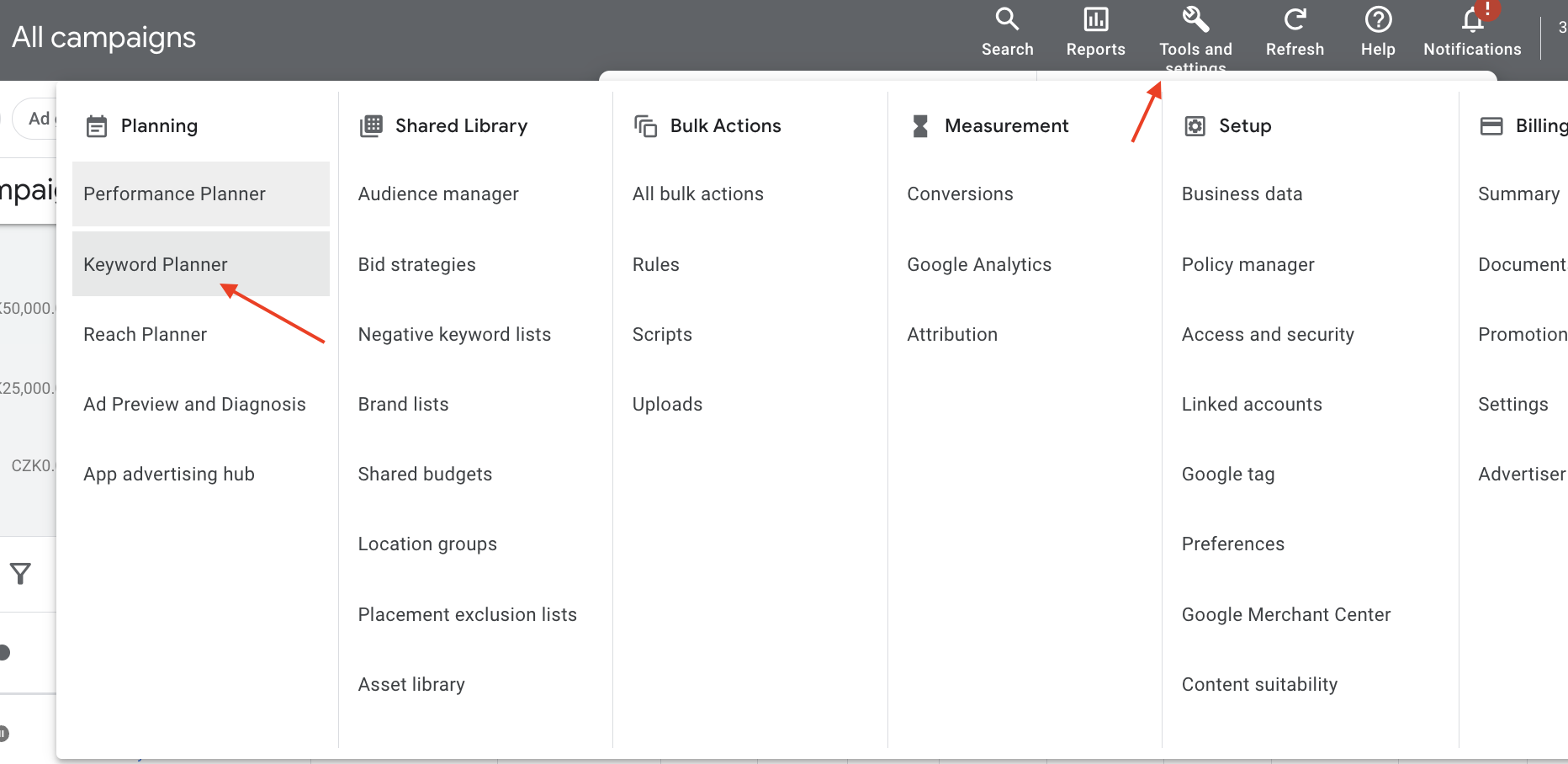
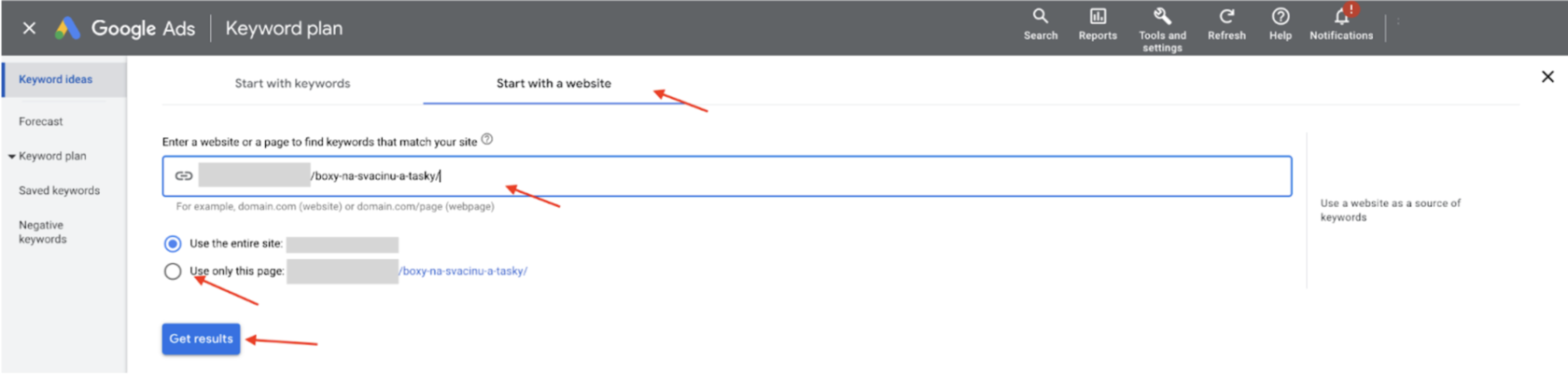
For example:
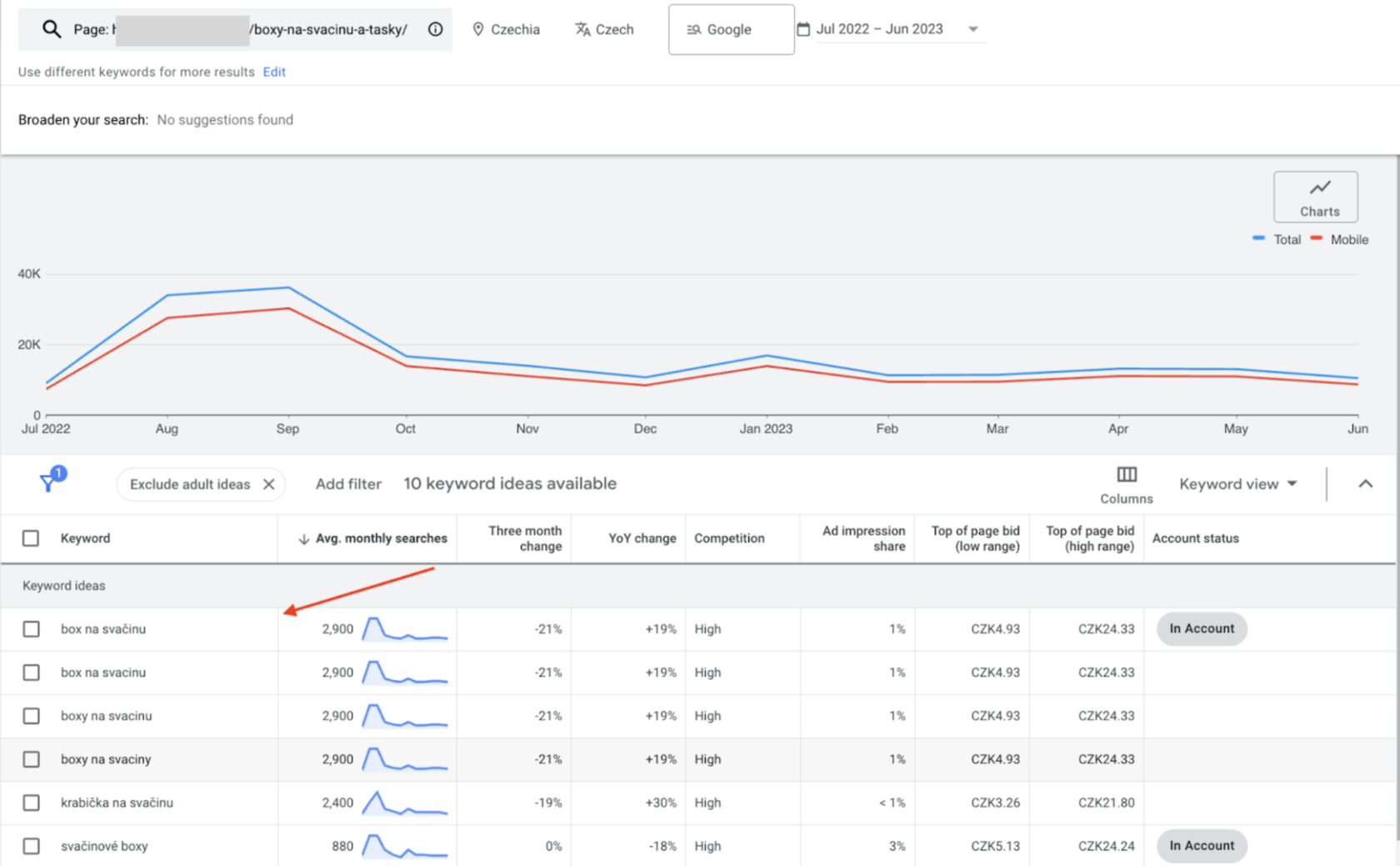
With this tool you’ll be able to understand monthly demand and when the season falls. Unfortunately Google Keyword Planner only surfaces a portion of the queries users actually type into Google.
That’s why it’s worth spending 1–2 months collecting data through Google Shopping. You’ll see queries that Google Ads Keyword Planner never shows you.
For example:
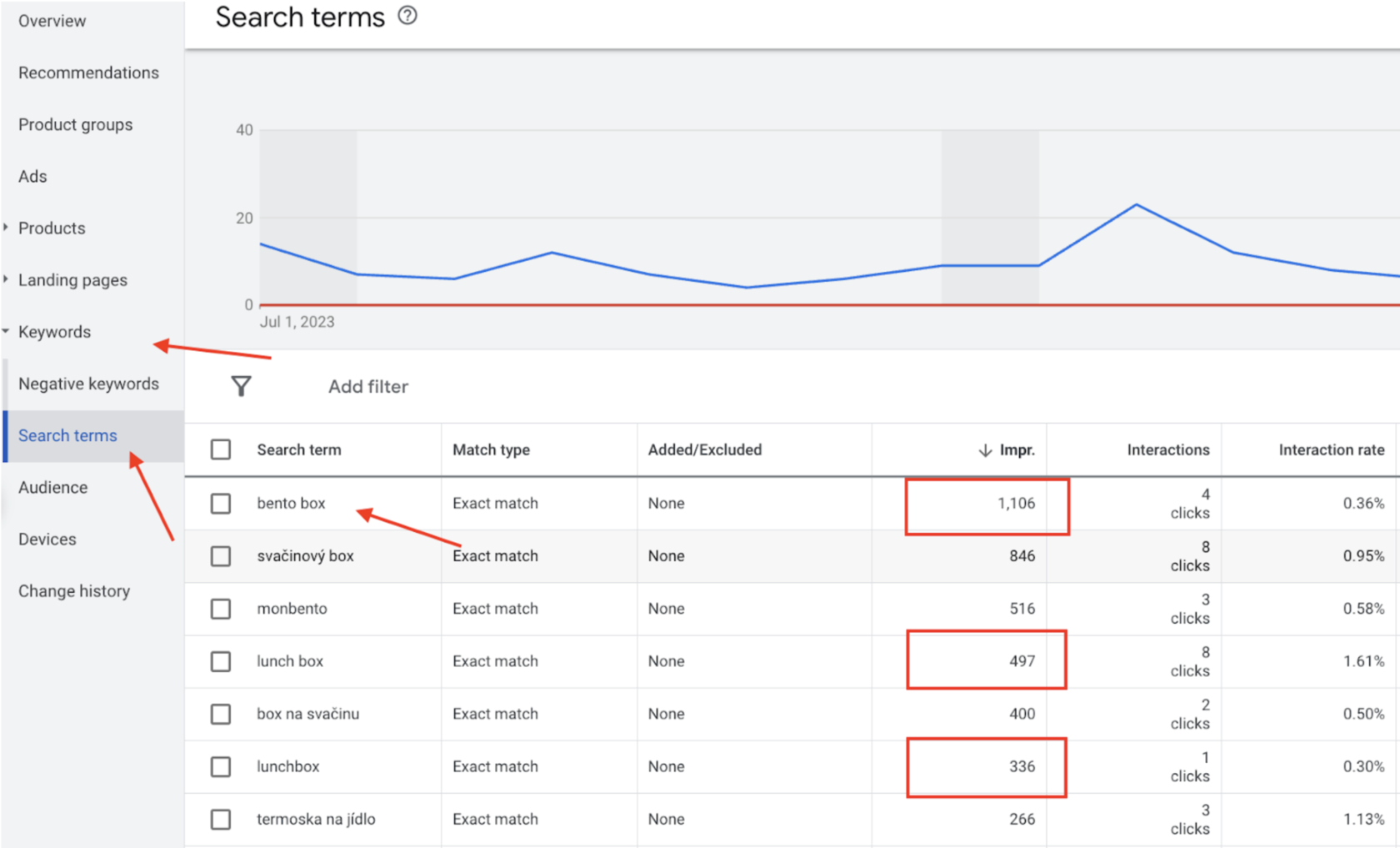
So I wouldn’t recommend relying solely on data from Google Ads Keyword Planner.
How can you apply this in your store?
Let’s say you sell: trousers, T-shirts, shirts, jumpers, backpacks.
Your task is to analyse what demand there is for each category and, based on the data, create several campaigns.
If we take all these categories, our structure will look like this:
- Trousers (total queries: 10,000)
- T-shirts (total queries: 7,000)
- Shirts (total queries: 1,500)
- Backpacks (total queries: 2,500)
There are product specifications you should also track.
Example: skinny jeans, a school or hiking backpack, and so on.
Important:
There’s a difference between launching Google Shopping and Performance Max. If you have a small budget (500 CZK/day), start with Google Shopping — you’ll understand it much better and prepare yourself for the move to Performance Max.
Margin — Google Shopping
Margin is calculated from your supplier prices. It’s important to run the economics of your business and understand what percentage you can afford to spend on advertising.
I want to dwell on this topic a little longer, because it’s very important for a business. It’s like the health of your online store: skipping the full examination and the general check-up leads to unpleasant results.
Calculate what the margin on your products is. That means including not just the cost of the product but delivery too. Typically delivery costs 2–4%.
Then calculate your other expenses:
- Warehouse
- Salaries
- Software
- Loans
- Returns
- Profit
- Other costs
Express all costs as a percentage of your current income, your revenue.
Imagine your total monthly income is 500 thousand crowns. All other costs come to 50 thousand crowns. So 10% is your current cost relative to income.
Your margin is 30%. Add 2–4% for delivery to that.
That leaves for marketing:
30 − 4 − 10 = 16%
So this is the ceiling, or the maximum amount you can spend on advertising while operating at a minimal profit. I’d take this as the baseline (why? That’s a topic for a separate article, but in short — not all advertising results can be tracked).
The 16% figure is what you can invest in advertising relative to revenue in this particular example.
It’s important to bear in mind that margins differ between products. So you need to split the assortment according to its margin.
Let’s explain using the previous example. Suppose your margin on trousers is 35%, so you can already afford to increase marketing spend by 5%.
But on shirts you only have a 20% margin, so adjustments are needed there. If you have the whole assortment in one campaign and work with the same economics, then in that product category you’ll be in the red.
Likewise, within a specific assortment there can be higher-margin products — those are worth segmenting too. We’ll go through the mechanics a little later; here it matters that you understand the principle itself.
For example:
- T-shirts — 25% (maximum affordable on advertising: 11%)
- Trousers — 35% (maximum affordable on advertising: 21%)
- Backpacks — 40% (maximum affordable on advertising: 26%)
- Shirts — 20% (maximum affordable on advertising: 6%)
Expected CPC — Google Shopping
Every category of your products has a different cost per click. So you can segment your assortment by expected cost per click.
This can also be done with the Google Ads KW Planner:
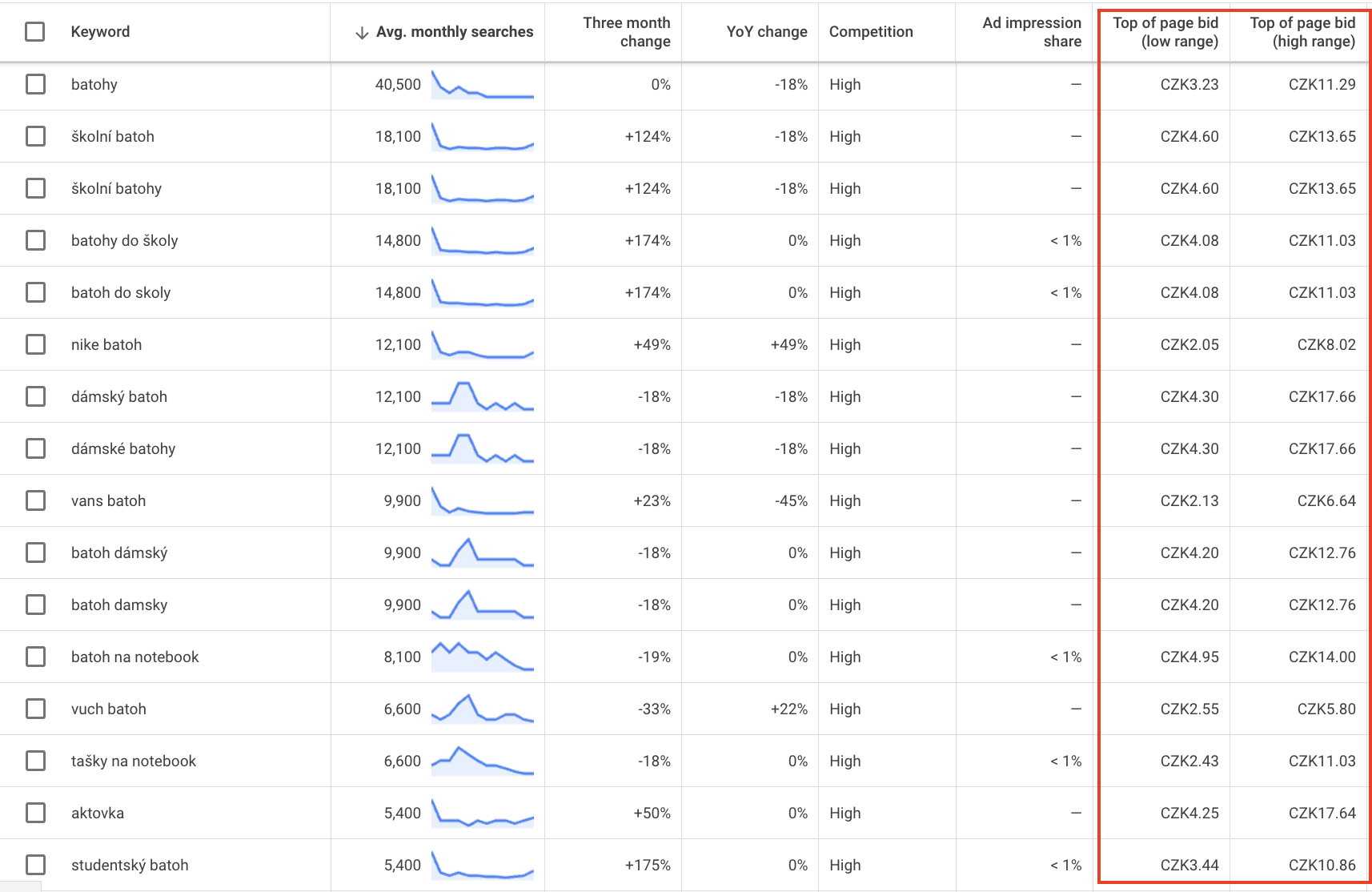
You can also substitute average order value. In most cases the higher the average product price, the higher the cost per click.
Important:
It’s worth combining different segmentation styles for your campaigns. In Google Shopping I choose combinations of Volume and COGS (cost of goods sold). This makes campaigns simpler to manage and optimise.
Relevance of your assortment
The relevance factor of your product plays an important role in increasing sales volume and in reducing or holding the cost-to-revenue ratio.
The main metric is an increase in impressions and an improvement in CTR. In other words, you want as many potential customers as possible to see your products, and as many clicks as possible.
We’ll split this factor into several points:
- Product title
- Modifiers
- Description
- Category
- Image and metadata
- GTIN/EAN (Global Trade Item Number / European Article Number)
Product title
Your product title carries very high value. And its principle is to “speak your customers’ language”.
I often see that store owners don’t name their product.
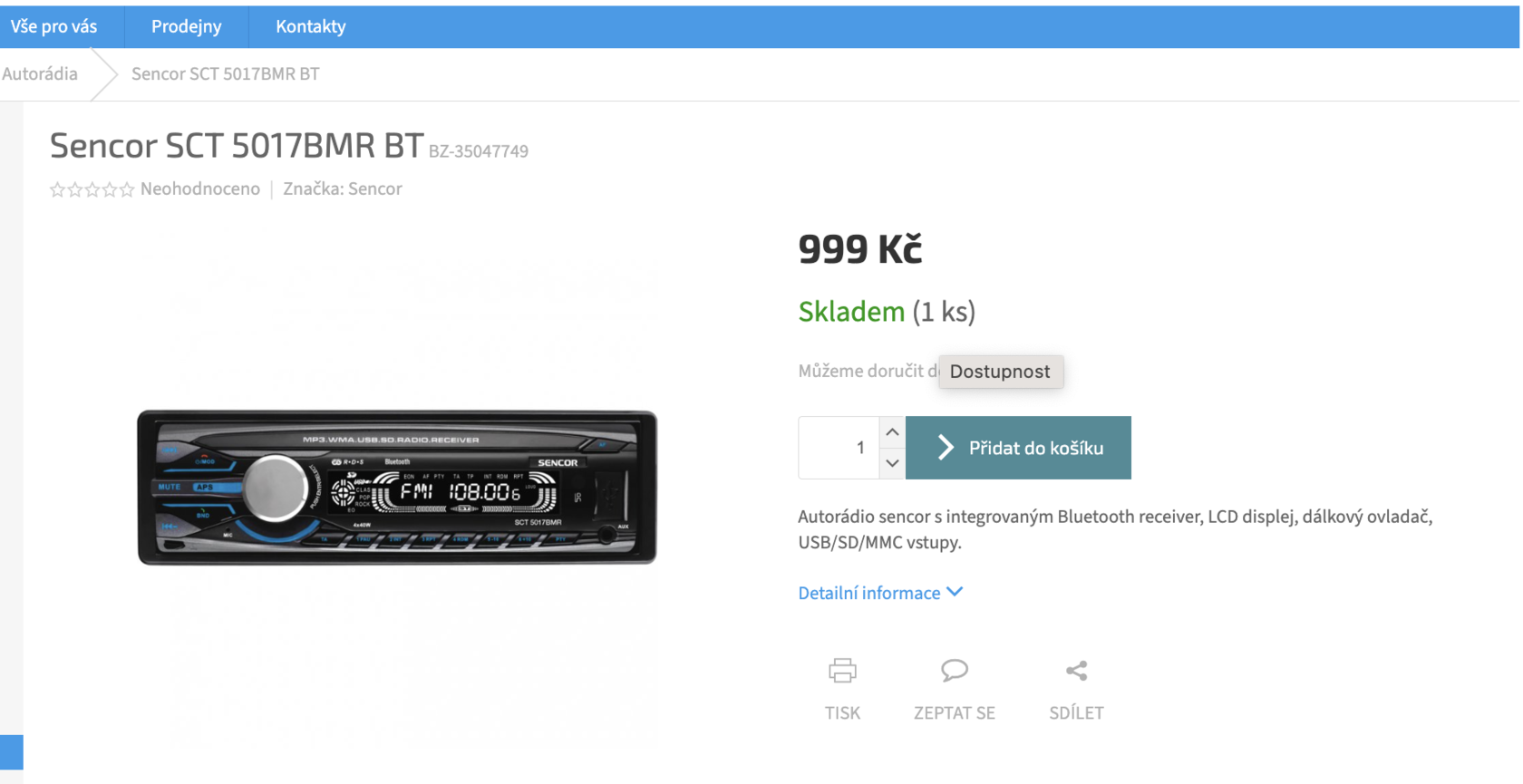
It’s important that you name products the way your customers search for them. In this case, “Car radio with USB, Bluetooth Sencor SCT 5017BMR BT”.
Example:
If you sell silicone moulds, you may be surprised by what your customers call them. For instance, our assortment includes silicone ice-cream moulds. We kept calling them “ice-cream shapers”, but based on the queries we renamed them to “moulds for ice lollies and ice cream”. Because there are far more of those queries:
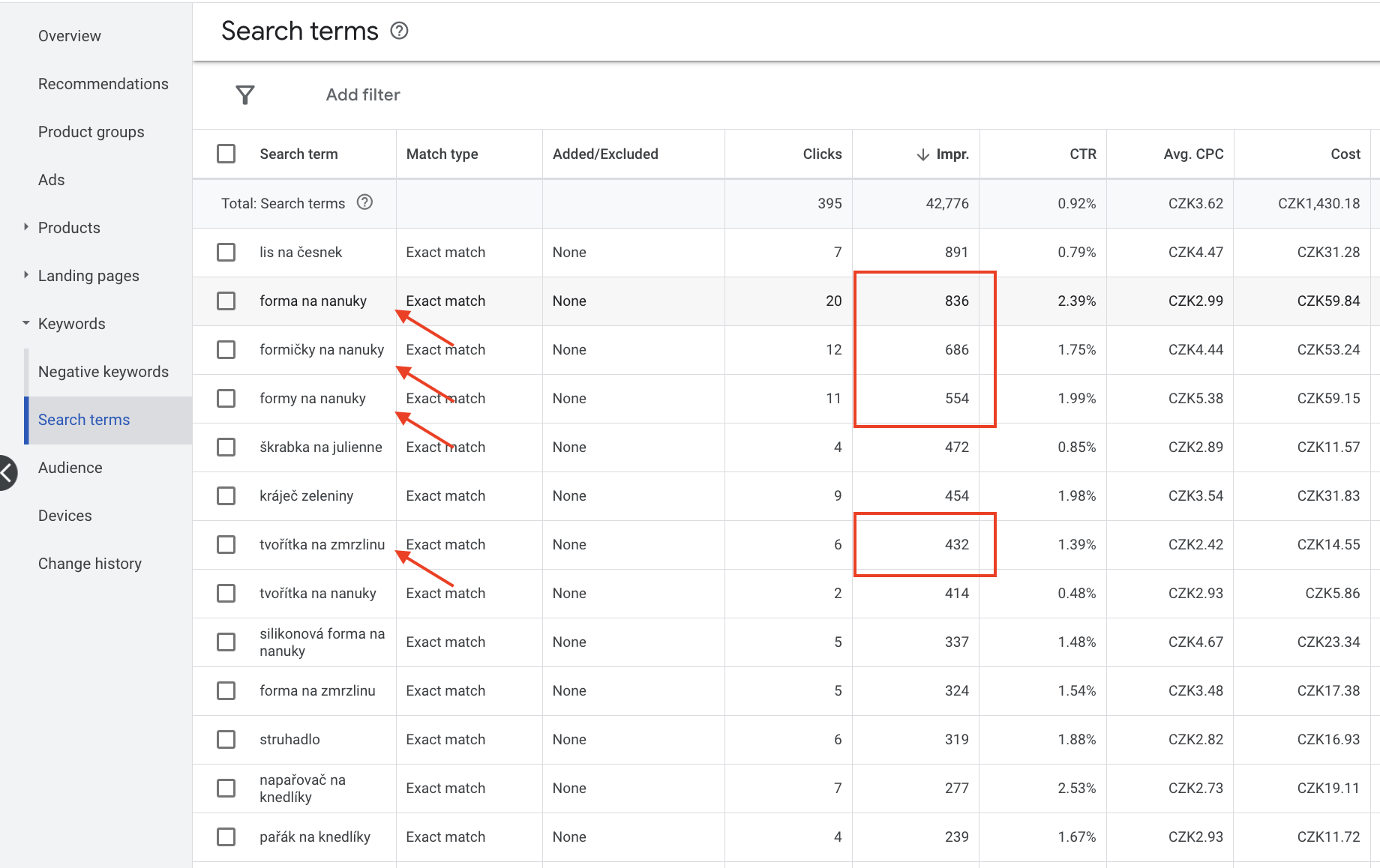
Use the maximum number of characters (150) with the help of modifiers.
Modifiers
It’s important not only to name products in the customer’s language but also to add further information, such as:
- Material
- Colour
- Size
- Style
- And so on
The recommended formula for building a product title:
Product title + Brand + Keyword + Modifiers
That said, it’s better to adapt it to market demand and to what you want to achieve. For example, you can include the brand if that brand is well known. But if you’re selling the product itself, the formula can be adjusted to suit you. You can test this and track it by CTR and impressions.
Product description
Use the maximum number of characters in each short product description. Put specifications into it, use cases with various keywords relevant to your product. Essentially everything that no longer fits in the title.
Product category
Choose the most relevant category from Google’s catalogue for your product. That way Google will be able to tune its algorithms better and show you on relevant keywords to a relevant audience.
Example:
There are many products with completely different purposes. If you sell cameras, you can split them into: action cameras, security cameras, webcams, camcorders, photo cameras and so on.
If, however, you set a broad category such as “Audio and Video”, that’s another barrier for Google, which leads to irrelevant queries and an excessive increase in your budget.
Images and metadata
Improve your images. Aim for high quality and full width. Where possible avoid watermarks and other added stickers. Details are described in Google’s documentation.
Here are a few examples:

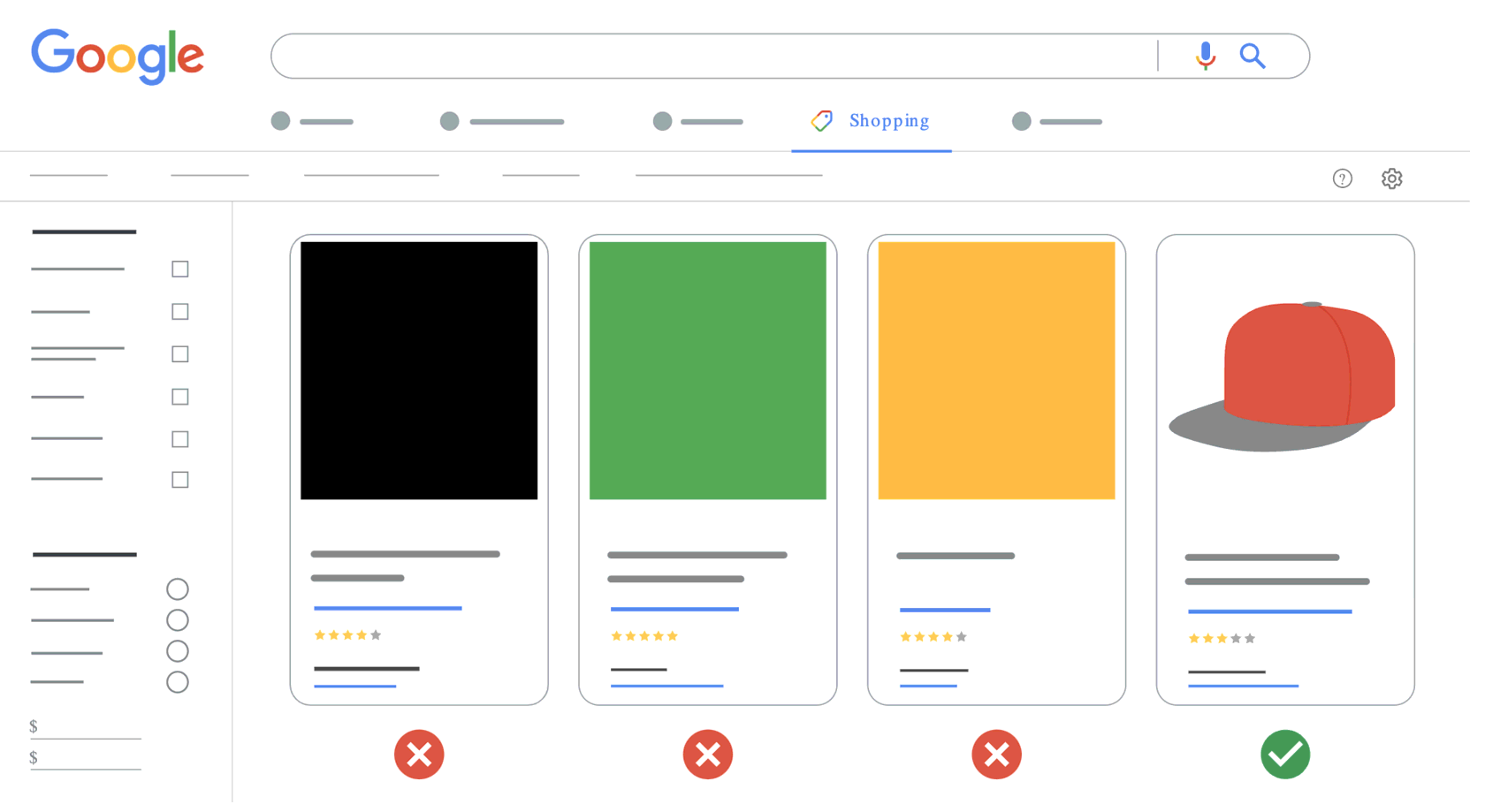
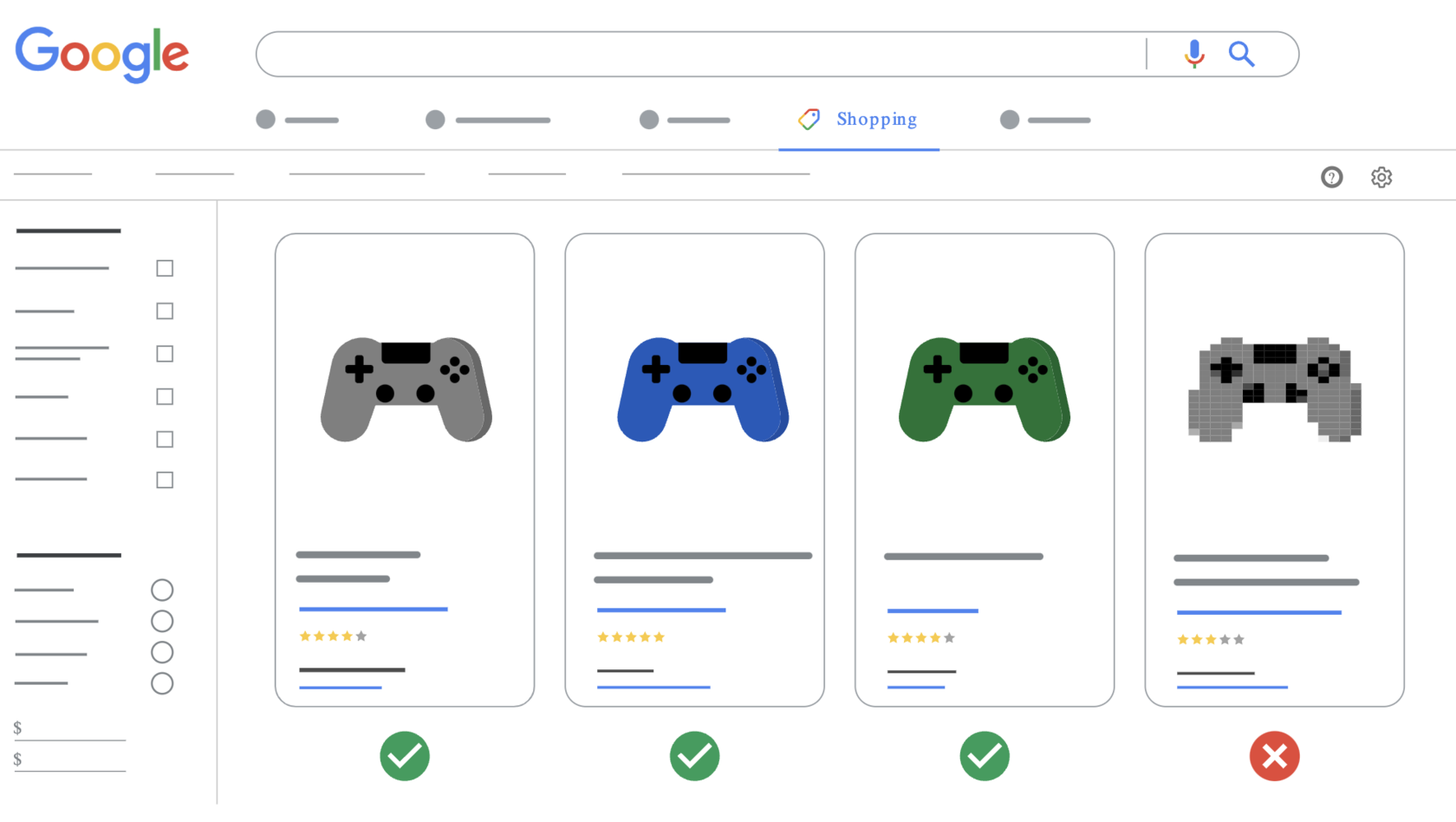
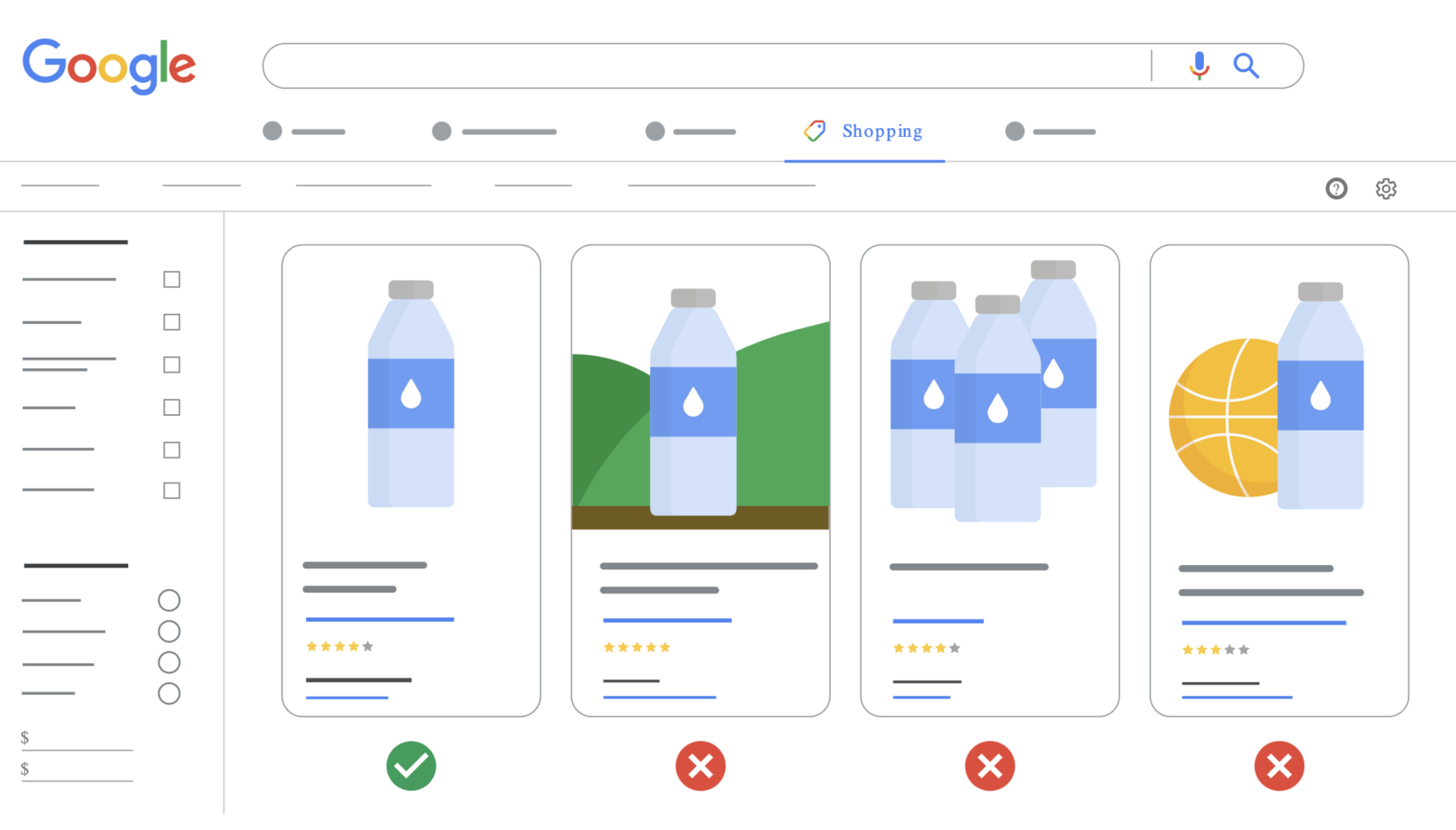
Set metadata for the images. That is, the image description should contain the product title with its brief characteristics and what it shows. That could be:
- In an interior
- Close-up photo of the lens
- Folding mechanism
- Texture
GTIN/EAN
You should get this value from your supplier or scan it from the product or packaging. It will help you with warehouse management too.
Your position in the market
The next and final factor is your current position in the market:
- Brand
- Historical campaign data
- Price
Brand
If you’ve invested in developing your brand and have repeat purchases from customers, that lets you win against competitors with a weak brand.
If you find you can buy the same products at the same price on Alza and in another store you don’t know, you’re more likely to be willing even to overpay in order to be sure you get value for your money. That means the Alza brand influences your buying process. And thanks to the brand, a store can sell products at a higher price and win a greater number of customers.
Historical data
From the data you can see which products sell through Google. In some cases only 5–10% of the assortment will be successful through Google. That’s why segmenting products helps you focus on the ones that bring you sales.
Price
A product’s price has a large influence on its position.
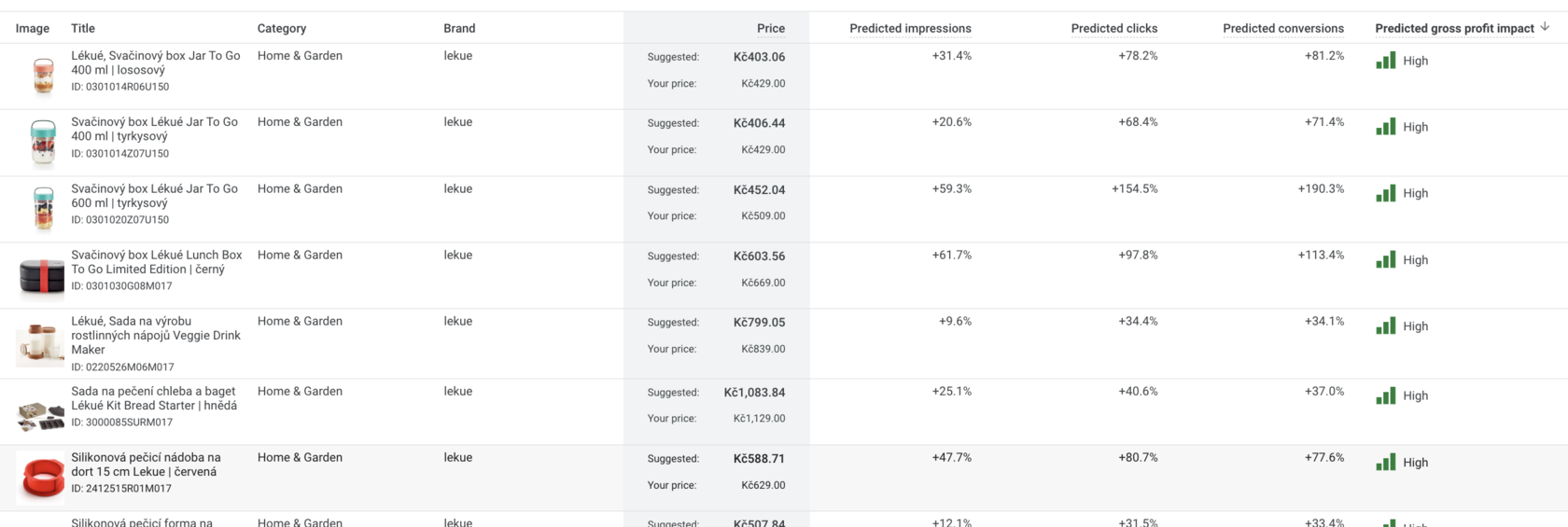
According to crealytics.com data, a 5% price increase can cause impressions to fall by up to 60%.
So price can have the following effects:

So with a minimal price change of 2–5% you can increase impressions and sales. Sometimes that step alone can lift the metrics by 30–200%.
Here’s a prediction report from Google Merchant Center:
Step-by-step guide
Let’s start from the very beginning: setting up campaigns within Google Shopping, not PMAX.
It’s important to prepare your assets, and for that you need three steps:
- Collecting data
- Analysing data
- Optimisation
Collecting data
Working with data and processing it leads to higher sales and better campaign efficiency. You need to understand the principles on which sales or advertising efficiency can be increased.
To start collecting data you should set up Google Shopping (Standard Shopping). Unfortunately Performance Max won’t show you comparable data.
First collect data to improve the relevance of your products. Specifically:
- Search queries
I recommend first creating campaigns with manual cost-per-click settings. For each product category you’ll be able to set your own maximum cost per click and thereby control the budget.
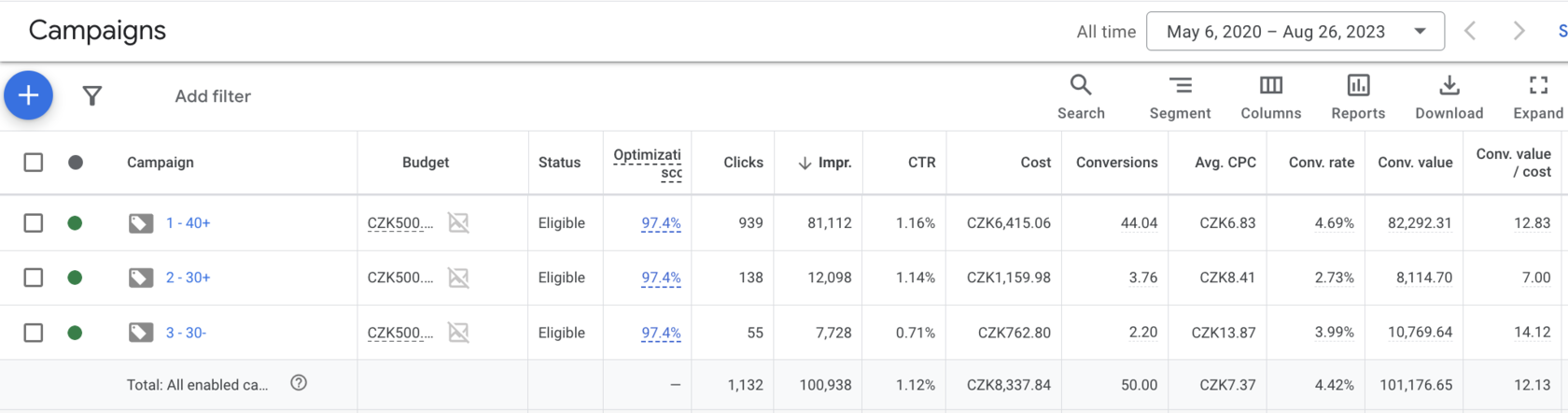
The campaign structure is best built on the rule: more campaigns, fewer ad groups.
Why does this rule matter?
When segmenting products it’s easier for you to:
- Manage campaigns rather than ad groups
- Get a better sense of which assortment has market demand and how its economics work
- Make better optimisation decisions
Example:
Analysing data
Analysis is built on specific metrics. To make decisions it’s important to focus on the appropriate metric.
If we’re looking at a campaign, then revenue and campaign efficiency are the key ones for us.
Specifically:
- Revenue
- ROAS or Conv. Value/Cost or cost-to-revenue ratio
You’ll see which campaigns generate revenue for you and how efficient they are.
Then you need to dig into them in more detail and look at deeper metrics.
Optimisation
Although it isn’t the most pleasant process, it has a large impact on your earnings.
It includes:
- Assortment relevance
- ROAS
- Products
- Placements
- Devices
- Audiences
- Time
- Day of the week
If you don’t have much time, I’d highlight three main points:
- Assortment relevance
- ROAS
- Optimisation at product level
Assortment relevance — optimisation
Optimising assortment relevance directly affects your sales. The key metrics are:
- Search impression share
- Impressions
- CTR (click-through rate)
To influence these metrics it’s important to analyse customer queries.
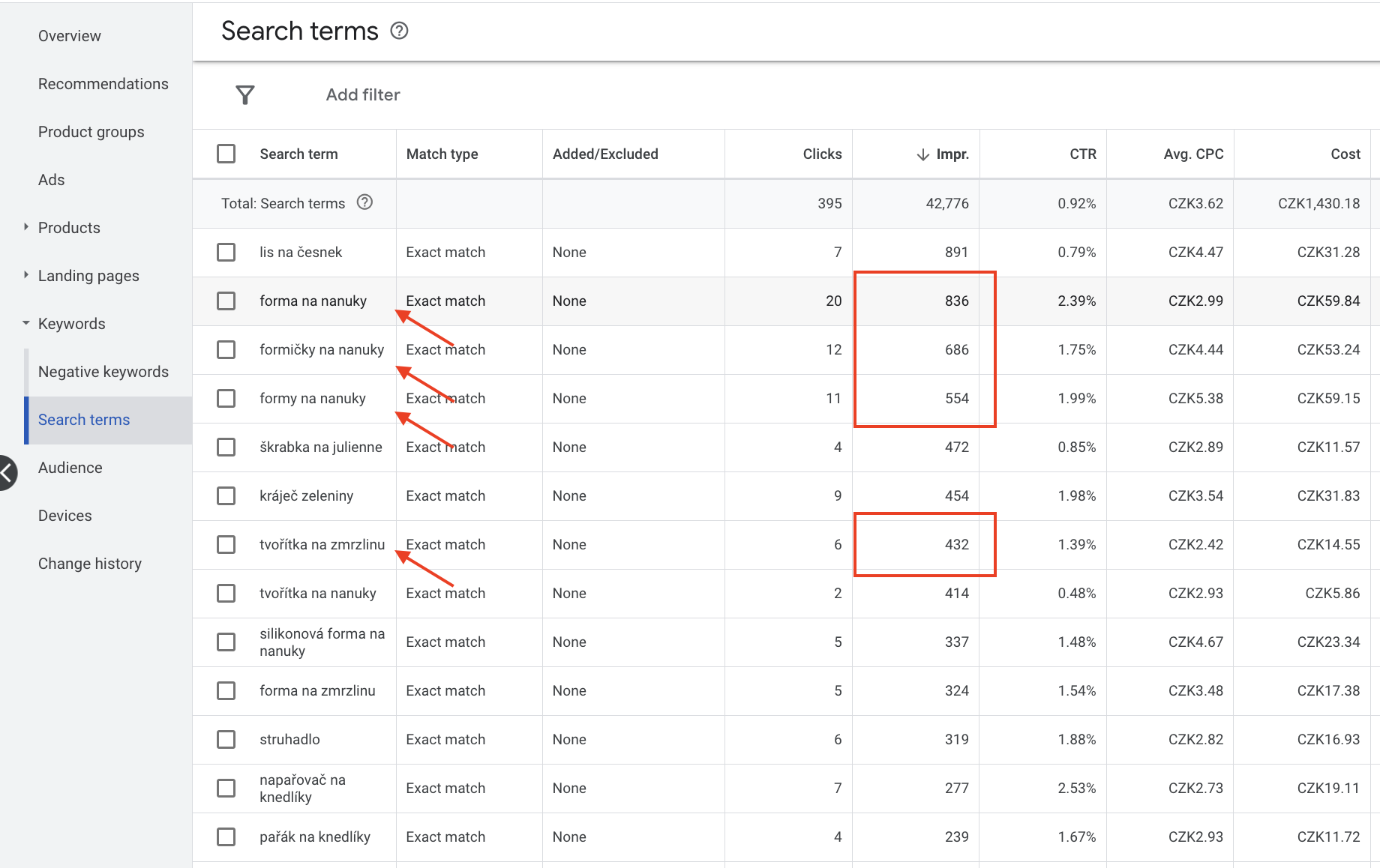
Step one: name products the way your customers name them.
Analysing customer queries by impressions, pick the ones relevant to your products.
Example:
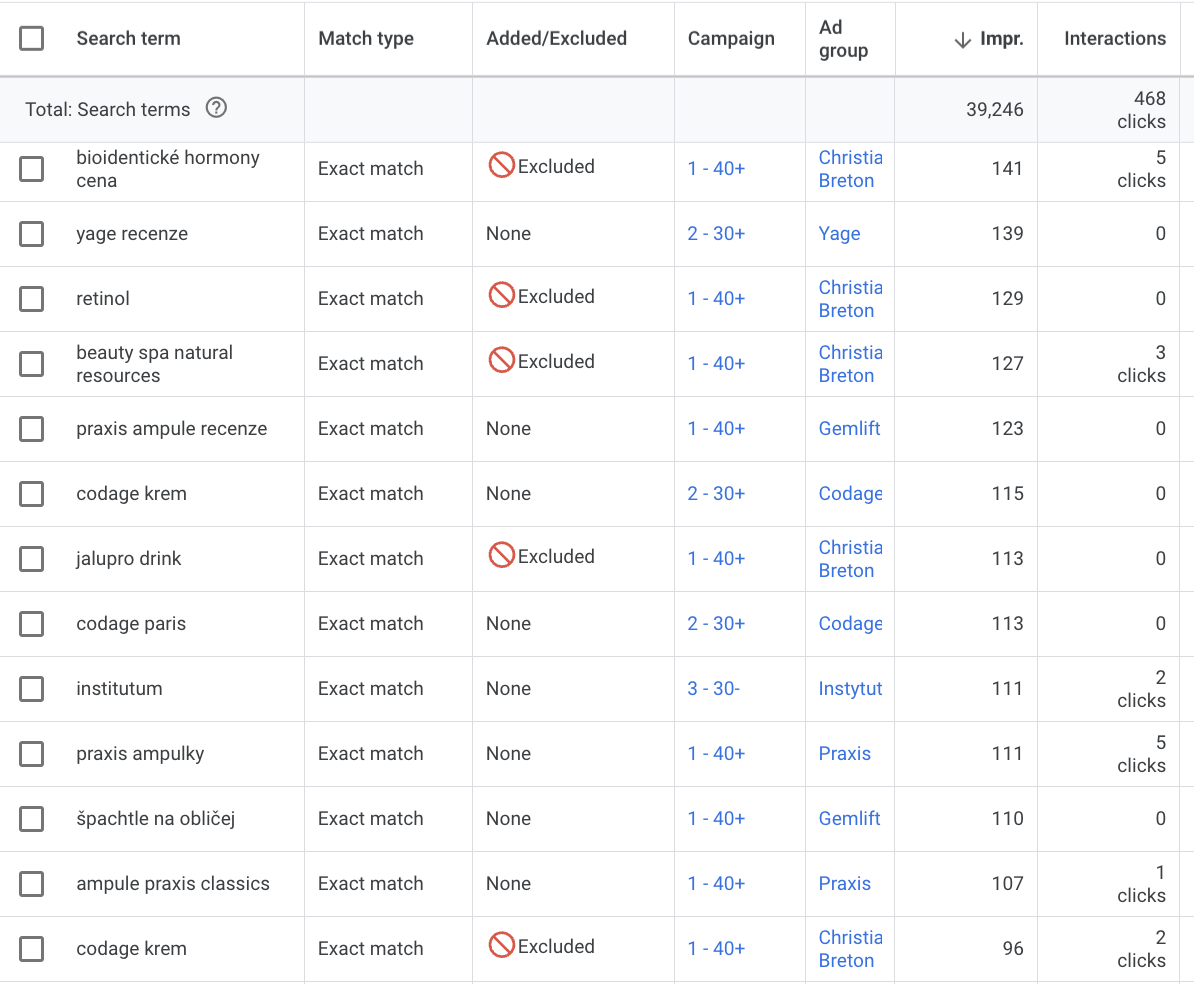
Step two: adding negative keywords.
Add queries unrelated to your products to the negative keyword list.
Example:
Step three: processing images.
Don’t use watermarks or stickers on images. The product photo should cover the full width and be on a white background.
Products — optimisation
Analysing your products and their efficiency matters. You need to check which products bring you profit in your case.
Example:
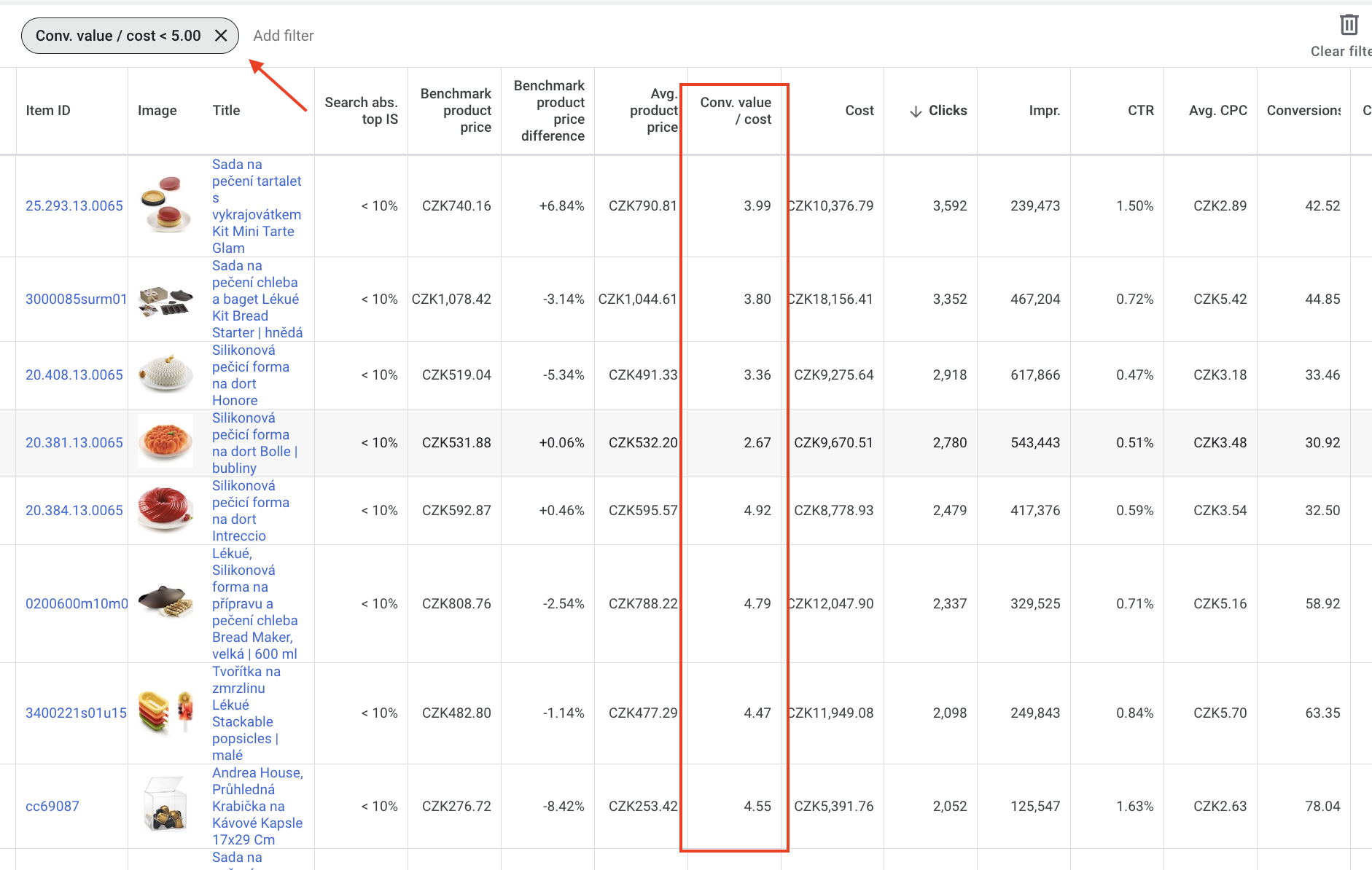
Use a filter to make searching easier.
You can switch products off or move them into a different campaign. I prefer the second option, because it lets you:
- Track seasonal products
- React to changes in demand
- If a product changes (price, description, images, reviews, title), demand can change too
Track several metrics and several time frames
Metrics for product-level optimisation:
- Number of sales
- Sales efficiency (ROAS, cost-to-revenue ratio)
- Impressions
- CTR (click-through rate)
Time frames:
- Last 30 days
- Last 90 days
- The whole period
Through working with products alone you’ll be able to influence your sales substantially. You can read examples of such stores here.
ROAS — optimisation
If you don’t work with ROAS by Google’s rules, the result is:
- Reduced impressions
- Worsening economics
- A drop in the number of sales
Overall this leads to your campaign ceasing to work.
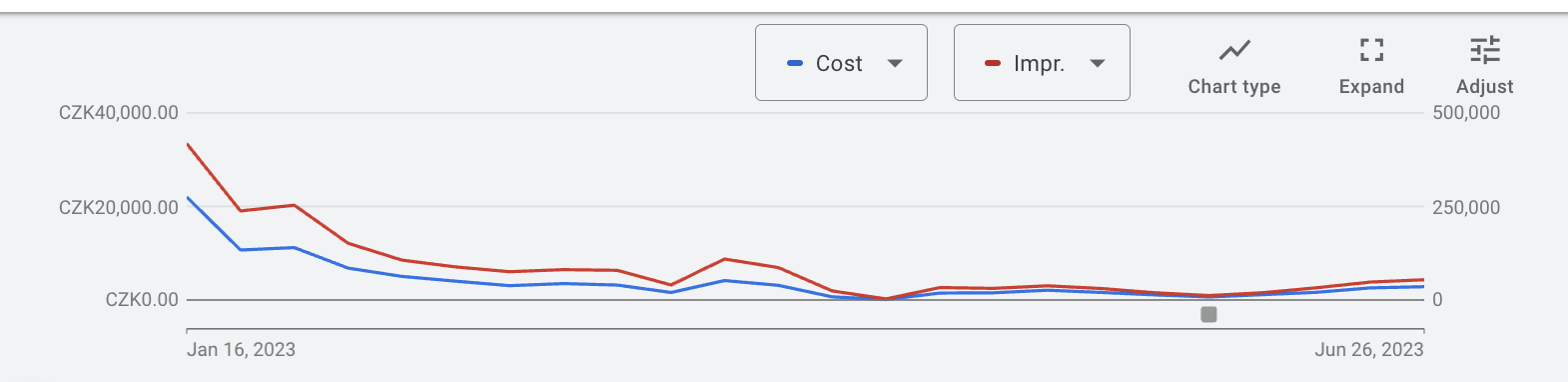
And it’s understandable why that happens. The market changes, every month has its own volume of queries for your products, so demand can fall or rise. You should work with ROAS in the same way.
Changes shouldn’t be made more often than once a month, and they should be small. Google often flags when it’s worth changing ROAS.
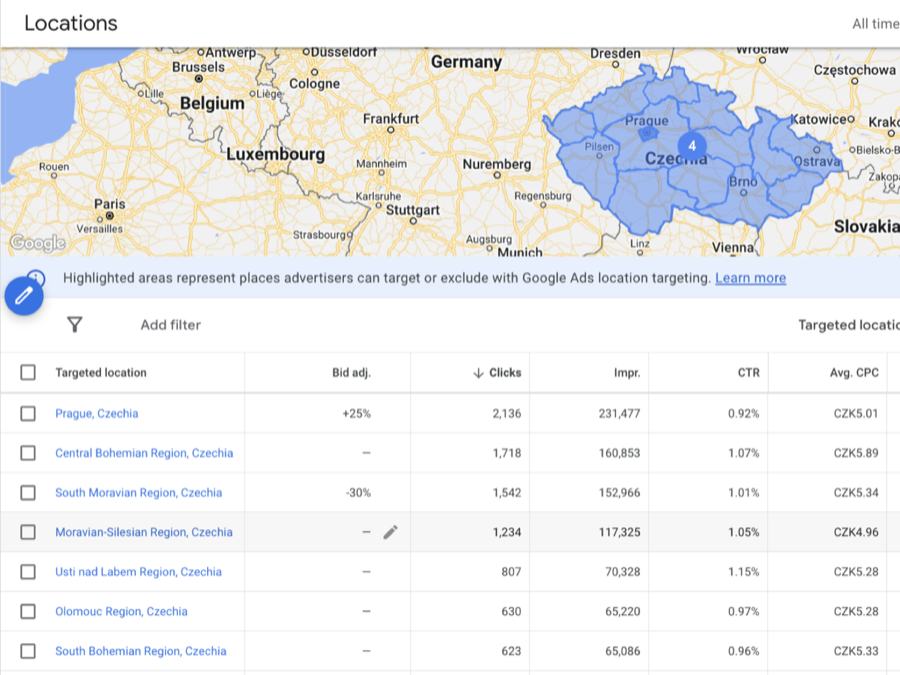
Locations — optimisation
This metric can be optimised at campaign level. That’s why it’s important to structure campaigns by the rule of more campaigns, fewer ad groups.
Metrics for optimisation:
- Revenue
- ROAS
Track them by country, region, city. Raise or lower the modifier.
Example:
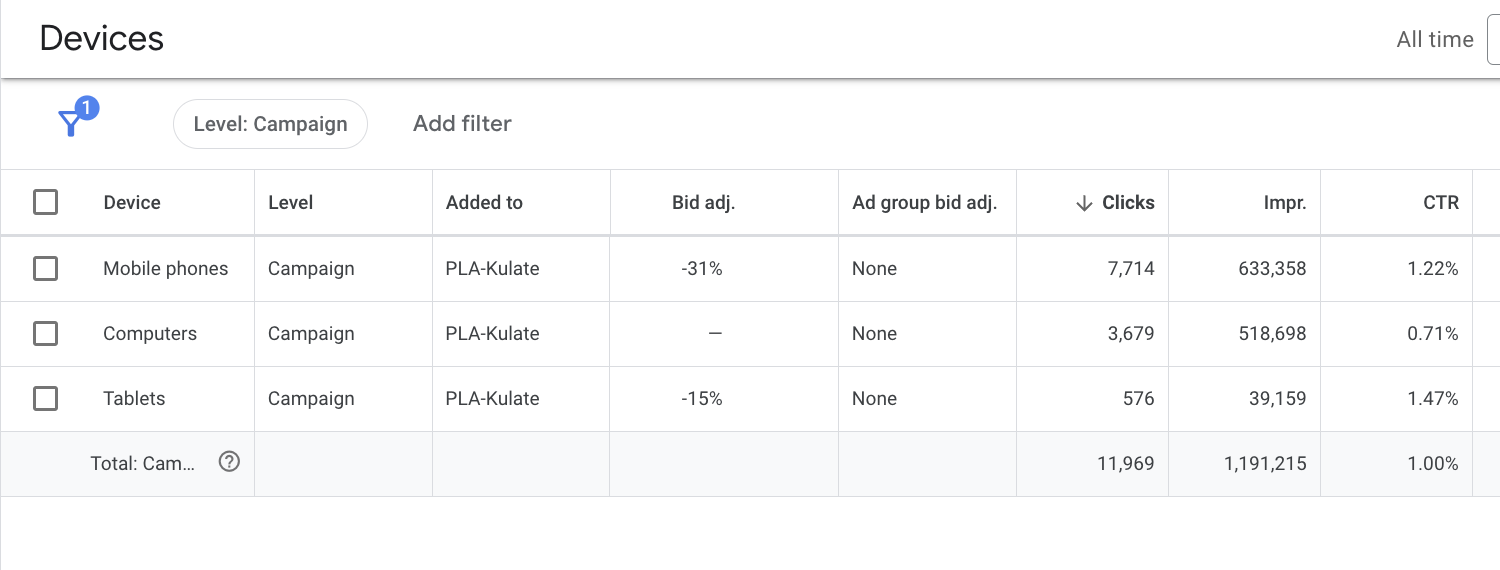
Devices — optimisation
Optimise advertising by device type on the same principle. There are 4 options here:
- Mobile devices
- Computer
- Tablet
- TV
Example:
Time and days of the week — optimisation
Examining specific hours in detail can also considerably affect your sales or, conversely, save budget.
So track which days of the week are profitable for you and which are loss-making, and adjust your budget with a modifier.
Example:
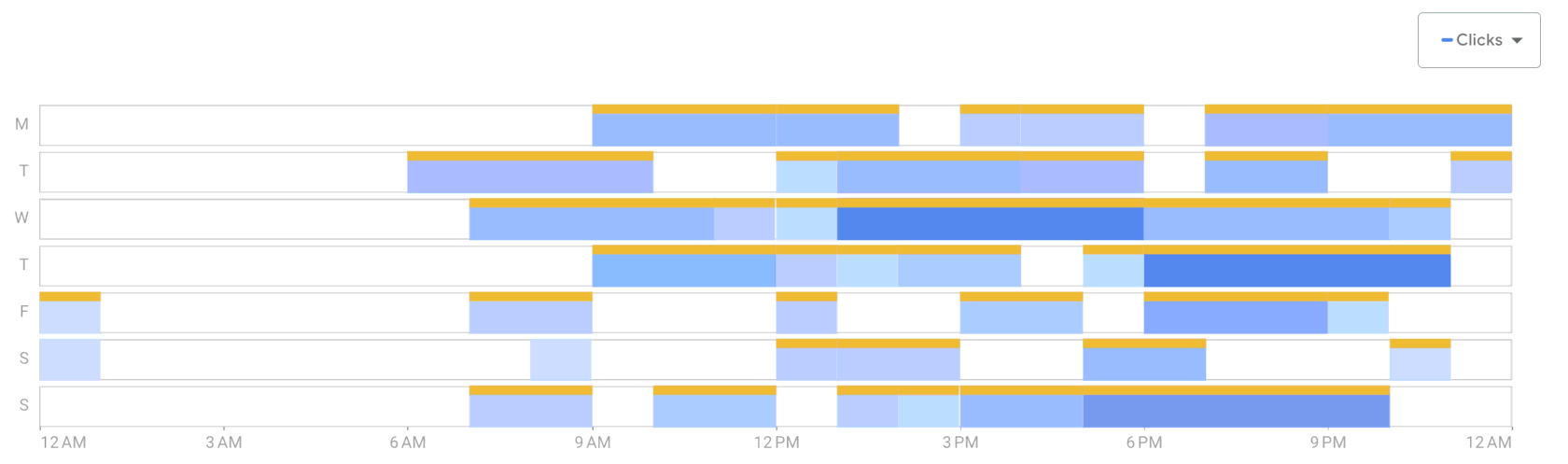
That said, you shouldn’t overdo it. Pick a rule and stick to it.
Audiences — optimisation
As for audiences, you have two ways of working with them:
- Observation
- Targeting
The difference is that the first shows you audience data: you can track it and adjust the cost-per-click / ROAS / CPA modifier.
The second option targets advertising at the selected audiences.
Example:
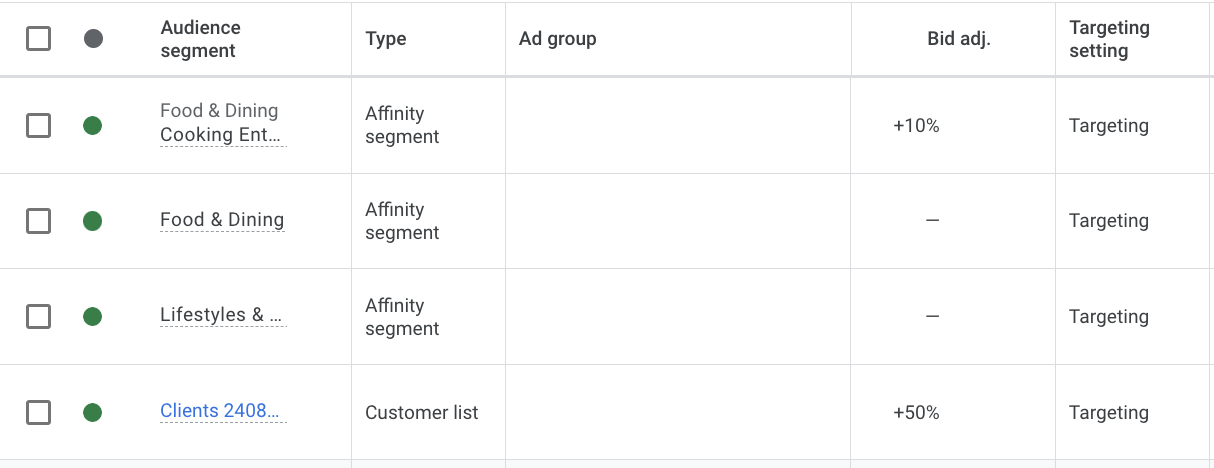
This data will let you optimise advertising and prepare the assets for launching Performance Max campaigns.
Performance Max structure
Once you’ve collected and prepared your assets:
- Processed the products
- Collected the search queries
- Know your audiences
- Have enough conversions (at least 30–40 a month)
- Have demographic data on your customers
- ROAS
You’re ready to launch Performance Max and to build the structure.
A PMAX campaign structure is made up of your product categories. It’s very important that you build the structure on the basis of specific categories.
For example: T-shirts separately, trousers separately.
Within a Performance Max campaign, segment the assortment on the basis of product variations.
So create asset groups with search queries for a specific direction, for example: school backpacks, women’s backpacks and so on.
If you have few conversions, campaigns most likely won’t have much effect.
So work out which categories bring you the most conversions, at least 30–40 a month, and only in that case can you launch a separate campaign for them. It doesn’t always work. You need to test.
Until that point it’s better to collect several product categories into one campaign and split them across asset groups.
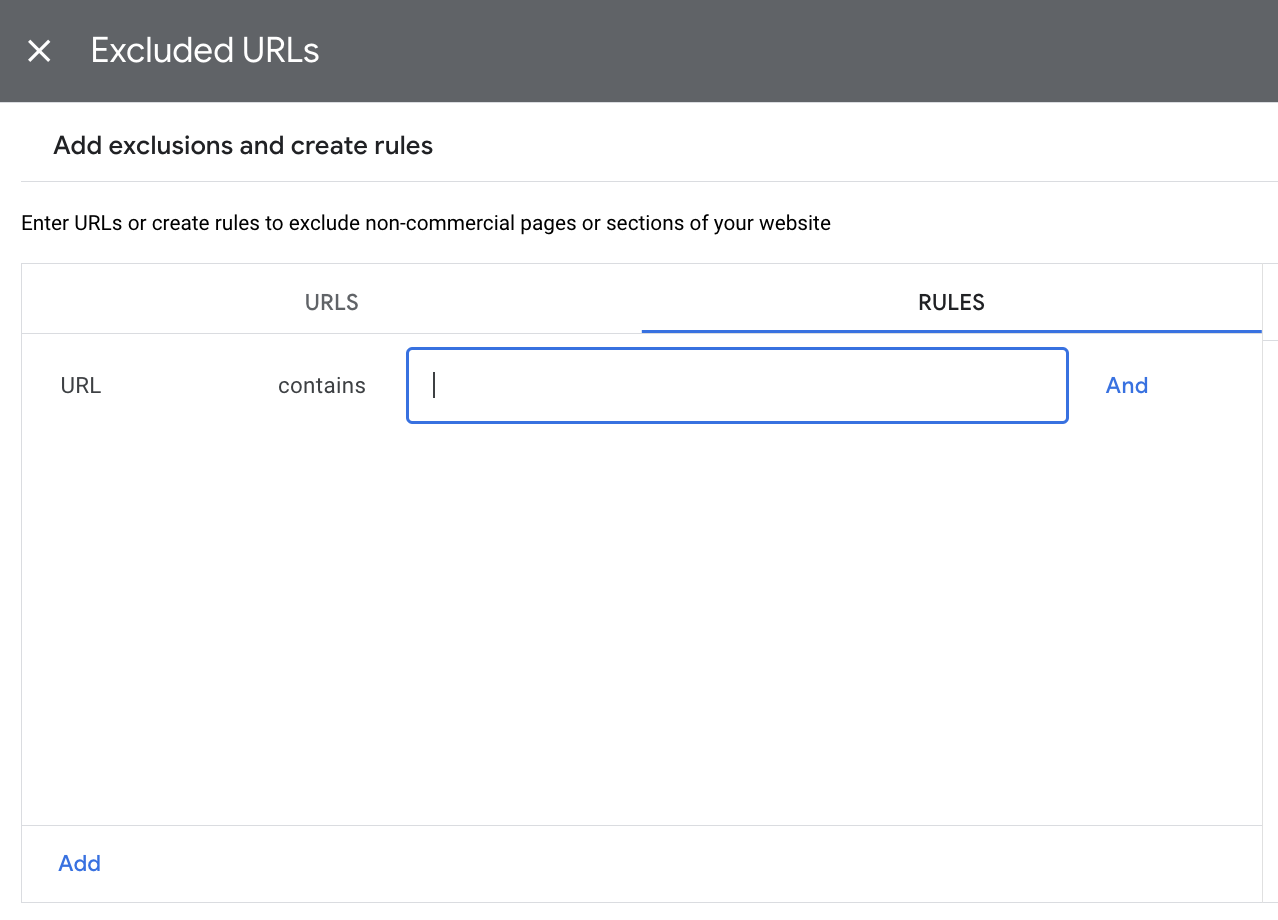
If you have enough data to create a separate campaign, don’t forget to work with URL exclusions for other products too. You can do this with rules.
You’ll need to create additional banner ads. Here I can recommend the app Canva. You’ll be able to quickly produce 5–10 creatives.
To understand which creative elements you need, use Google’s Ads Transparency. Pick competitors who are running ads and look at the banners they use.
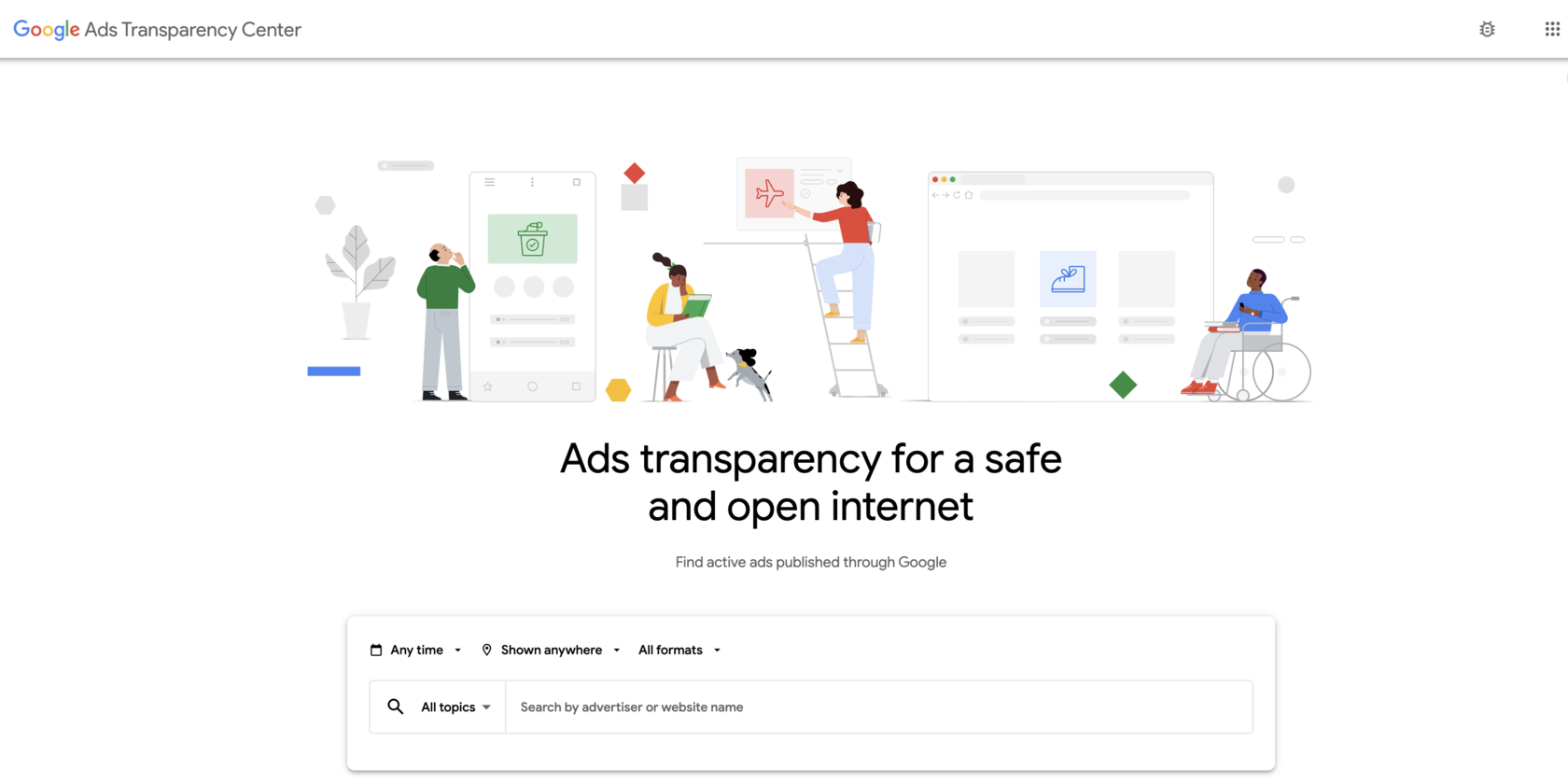
Videos can also be made in Canva. You can draw inspiration from competitors via Ads Transparency.
You have the copy on the basis of your customers’ queries. Try either writing the ads yourself using keywords and your advantages, or creating ads with the help of Chat GPT by OpenAI.
All of this will help you create so-called “Always On” campaigns that will deliver results over the long term.
Summary for running campaigns
Campaign structure
When and which campaign type to use:
- If you’re just starting out, use Google Shopping and segment by search volume and margin.
- If PMAX is already running with your whole assortment in it — segment the assortment by category based on conversion counts, and within the same campaign create additional asset groups for specific categories.
- If your PMAX campaigns have been running for a long time, segment them by the performance of a specific category and try exclusions within the campaign itself. It doesn’t always work.
Well-prepared assets
- Products
- Audiences
- Copy
- Banners
Optimisation
- Assortment relevance
- ROAS
- Products
Google Ads Budget: How to Size, Split and Change It
Work out what your store can spend on Google Ads from margin and conversion volume, and see what 1,360 store-months show about ROAS when spend rises.
Ten categories — ten campaigns? Each of them needs 15 conversions a month
"Dumping every product into one campaign is absurd" — the most common objection from owners of multi-category stores. What actually decides who Google shows your product to, and when splitting by category is genuinely needed.
Google Ads Bidding Strategies: Choose by Monthly Conversions
Find the strategy your Shopping and Performance Max campaigns can carry: under about 30 conversions a month, one campaign without a target, steered by budget.
Google Ads no longer gives you more than you asked for: why a 600% ROAS becomes 400%
On 17 August Google changed how target-based bidding works in budget-limited campaigns. Overperformance is gone. What it means for your store and what to do.
How Much Does Google Ads Cost an Online Store?
See what you pay for Google Ads per click, per tested product and per month: in our study of 1.4 million products, a click cost $0.20 on average.
Target ROAS (tROAS) in Shopping and PMax: Set, Adjust, Check
Find a Target ROAS for Shopping and Performance Max that stays above break-even and still spends the budget, then change it by no more than 15% at a time.